# CyVerse Core Software Documentation — full corpus
Each page below begins with its canonical URL followed by its original Markdown, OKF frontmatter included. Relative links have been rewritten to absolute URLs.
---8<--- https://docs.cyverse.org/about/overview/
---
type: Reference
title: "About this documentation"
description: "What CyVerse is, who this documentation is for, and where each audience should start."
tags: [about, orientation]
status: stable
generated: { by: process:okf-migration, at: 2026-07-29T00:00:00Z }
sources:
- id: okf-spec
resource: https://github.com/GoogleCloudPlatform/knowledge-catalog/blob/main/okf/SPEC.md
title: Open Knowledge Format v0.2 specification
author: team:google-cloud-platform
last_modified: 2026-07-29
---

# What CyVerse is
CyVerse is a computational infrastructure for data-intensive science, and the
people who operate it. It is fully open source and funded by the
[United States National Science Foundation](https://www.nsf.gov/){target=_blank}.
It is both a Software as a Service platform and the Infrastructure as Code needed
to run one: the same stack that serves the public US deployment can be deployed by
another institution on its own hardware or in the cloud. That is what this
documentation is for.
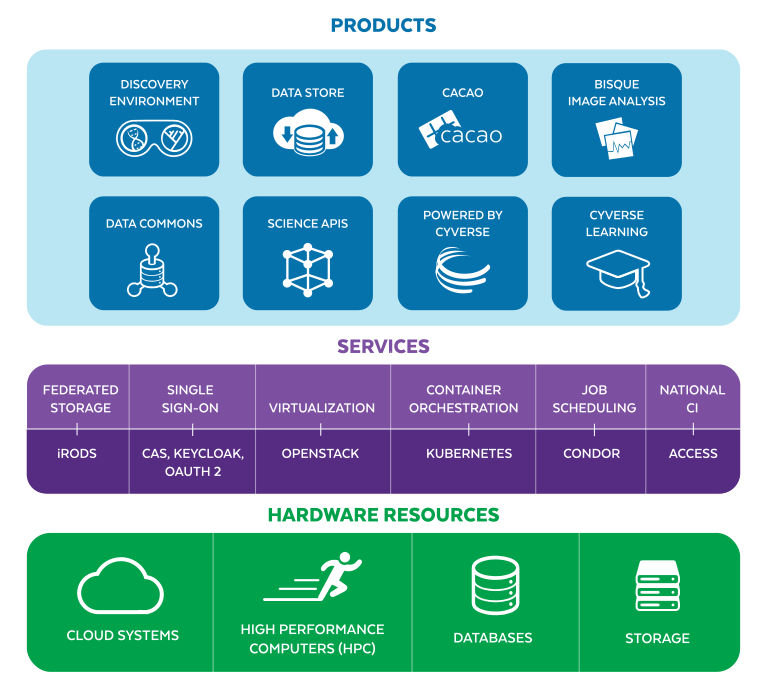{width=800}
Hardware at the bottom, services in the middle, products on top
# Who this is for
## Deploying CyVerse
Start with [prerequisites](https://docs.cyverse.org/deployment/planning/prerequisites/), then read
[deploying from scratch](https://docs.cyverse.org/deployment/from-scratch/) end to end before running
anything. Work the phases in [deployment](https://docs.cyverse.org/deployment) in order, and check each one
against [verification](https://docs.cyverse.org/deployment/07-post-install/verification/).
Before provisioning: [component inventory and
sizing](https://docs.cyverse.org/architecture/component-inventory/) and [network
requirements](https://docs.cyverse.org/architecture/network-requirements/).
## Operating a deployment
[operations/](https://docs.cyverse.org/operations) covers day-to-day administration: users and VICE access
in [DE administration](https://docs.cyverse.org/operations/discovery-environment/), data and curation in
[Data Store administration](https://docs.cyverse.org/operations/data-store/), accounts in [User Portal
administration](https://docs.cyverse.org/operations/user-portal/), and the recurring questions in the
[FAQ](https://docs.cyverse.org/operations/faq/).
## Integrating with the APIs
[Terrain](https://docs.cyverse.org/api/terrain/) is the API behind every CyVerse product. The
[endpoint index](https://docs.cyverse.org/api/endpoint-index/) lists everything documented here, and the
live [Swagger reference](https://de.cyverse.org/terrain/docs/){target=_blank} is
the most current source. Authentication is [OAuth 2.0 through
Keycloak](https://docs.cyverse.org/platform/authentication/).
## Contributing code
[development/](https://docs.cyverse.org/development) covers the development environment and contribution
workflow. Source lives in the
[CyVerse](https://github.com/cyverse){target=_blank} and
[CyVerse DE](https://github.com/cyverse-de){target=_blank} GitHub organizations.
# What CyVerse offers its users
| Product | What it does |
|---------|--------------|
| [Discovery Environment](https://docs.cyverse.org/platform/discovery-environment/) | Web-based data science workbench with hundreds of integrated tools |
| [Data Store](https://docs.cyverse.org/platform/data-store/) | Multi-petabyte iRODS storage with HTTPS, WebDAV, SFTP, and API access |
| [Data Commons](https://docs.cyverse.org/platform/data-commons/) | Publishing curated and community-released datasets, with DataCite DOIs |
| VICE | Interactive computing — JupyterLab, RStudio, Shiny — inside the DE |
| [Cloud services (CACAO)](https://docs.cyverse.org/platform/cloud/) | Infrastructure as code for multi-cloud deployments |
| [BisQue](https://docs.cyverse.org/platform/bisque/) | Bio-image semantic query and analysis |
| [DNA Subway](https://docs.cyverse.org/platform/dna-subway/) | Educational genomics workflows |
# How this documentation is organized
This bundle follows the [Open Knowledge Format](https://github.com/GoogleCloudPlatform/knowledge-catalog/blob/main/okf/SPEC.md)
v0.2.[^okf-spec] In practice that means three things you can rely on:
* **Every document declares itself.** Frontmatter carries its `type`, a one-line
`description`, `tags`, and a `status` of `draft`, `stable`, or `deprecated`. A
`draft` document is incomplete and says so rather than pretending otherwise.
* **Every directory has an index.** `index.md` lists what is in a directory with a
line of description each, so you can see what exists before opening anything.
* **Derived documents cite their sources.** Where a document was written from
something else, `sources` in its frontmatter says what, including material
mirrored under [references/](https://docs.cyverse.org/references).
Changes to the bundle are recorded in [the log](https://docs.cyverse.org/log/).
# Links
* :material-web: [CyVerse website](https://cyverse.org){target=_blank}
* :material-frequently-asked-questions: [FAQ](https://docs.cyverse.org/operations/faq/)
* :simple-github: [GitHub organization](https://github.com/cyverse-de){target=_blank}
* :material-api: [Live Terrain API](https://de.cyverse.org/terrain/docs/){target=_blank}
* :simple-docker: [Harbor registry](https://harbor.cyverse.org/){target=_blank}
* :material-school: [User-facing learning materials](https://learning.cyverse.org/){target=_blank}
# Funding
[{width=100}](https://www.nsf.gov/){target=_blank}
CyVerse has been funded by the National Science Foundation from 2008 to the
present.
[](https://www.nsf.gov/awardsearch/showAward?AWD_ID=0735191) [](https://www.nsf.gov/awardsearch/showAward?AWD_ID=1265383) [](https://www.nsf.gov/awardsearch/showAward?AWD_ID=1743442)
!!! Info ":fontawesome-brands-creative-commons-by: SOFTWARE LICENSE"
Copyright (c) 2010-2026, The Arizona Board of Regents on behalf of The University of Arizona
All rights reserved.
Developed by: CyVerse as a collaboration between participants at BIO5 at The University of Arizona (the primary hosting institution), Cold Spring Harbor Laboratory, The University of Texas at Austin, and individual contributors. Find out more at http://www.cyverse.org/.
Redistribution and use in source and binary forms, with or without modification, are permitted provided that the following conditions are met:
* Redistributions of source code must retain the above copyright notice, this list of conditions and the following disclaimer.
* Redistributions in binary form must reproduce the above copyright notice, this list of conditions and the following disclaimer in the documentation and/or other materials provided with the distribution.
* Neither the name of CyVerse, BIO5, The University of Arizona, Cold Spring Harbor Laboratory, The University of Texas at Austin, nor the names of other contributors may be used to endorse or promote products derived from this software without specific prior written permission.
THIS SOFTWARE IS PROVIDED BY THE COPYRIGHT HOLDERS AND CONTRIBUTORS "AS IS" AND ANY EXPRESS OR IMPLIED WARRANTIES, INCLUDING, BUT NOT LIMITED TO, THE IMPLIED WARRANTIES OF MERCHANTABILITY AND FITNESS FOR A PARTICULAR PURPOSE ARE DISCLAIMED. IN NO EVENT SHALL THE COPYRIGHT HOLDER OR CONTRIBUTORS BE LIABLE FOR ANY DIRECT, INDIRECT, INCIDENTAL, SPECIAL, EXEMPLARY, OR CONSEQUENTIAL DAMAGES (INCLUDING, BUT NOT LIMITED TO, PROCUREMENT OF SUBSTITUTE GOODS OR SERVICES; LOSS OF USE, DATA, OR PROFITS; OR BUSINESS INTERRUPTION) HOWEVER CAUSED AND ON ANY THEORY OF LIABILITY, WHETHER IN CONTRACT, STRICT LIABILITY, OR TORT (INCLUDING NEGLIGENCE OR OTHERWISE) ARISING IN ANY WAY OUT OF THE USE OF THIS SOFTWARE, EVEN IF ADVISED OF THE POSSIBILITY OF SUCH DAMAGE.
[^okf-spec]: https://docs.cyverse.org/about/Open Knowledge Format v0.2 specification
---8<--- https://docs.cyverse.org/about/contributing/
---
title: "Contributing to these docs"
description: "How to edit pages, the OKF frontmatter contract, verifying migrated content, and building and validating the site locally."
type: Guide
tags: [about, contributing, okf]
status: stable
generated:
by: "claude/opus-5"
at: "2026-09-18T00:00:00Z"
sources:
- id: okf-spec
resource: "https://github.com/GoogleCloudPlatform/knowledge-catalog/blob/main/okf/SPEC.md"
title: "Open Knowledge Format (OKF) v0.2 specification"
author: "team:google-cloud"
- id: carc-contributing
resource: "https://unm-carc.github.io/docs/about/contributing/"
title: "UNM CARC documentation: Contributing to these docs"
author: "team:unm-carc"
---
# Contributing to these docs
This documentation is a git repository of Markdown files, built with
[Zensical](https://zensical.org){target=_blank} and structured as an
[Open Knowledge Format (OKF) v0.2](https://github.com/GoogleCloudPlatform/knowledge-catalog/blob/main/okf/SPEC.md){target=_blank}
knowledge bundle. Every page is readable by people *and* consumable by AI
agents, with provenance and trust signals in its frontmatter (see
[For AI agents](https://docs.cyverse.org/about/ai-agents/)).
## Small fixes
Every page has an **edit button** (:material-file-edit-outline:) in the upper
right that opens the source file on GitHub. Fix the text and open a pull
request; CI validates it, and it deploys once merged to `main`.
## The frontmatter contract
Every content page starts with YAML frontmatter. `type` is required by OKF;
the rest make the page trustworthy and discoverable:
```yaml
---
type: Deployment Procedure # see the type list in "For AI agents"
title: "Page title"
description: "One sentence used by search, indexes, and agents."
tags: [deployment, postgresql]
status: stable # draft | stable | deprecated (default: stable)
generated:
by: "human:yourusername" # who or what wrote the current content
at: "2026-09-18T00:00:00Z"
sources: # where the content came from (optional)
- id: upstream
resource: "https://github.com/cyverse-de/..."
title: "Original source"
author: "team:cyverse"
---
```
Section `index.md` files are OKF directory listings and carry **no
frontmatter** (the bundle root `index.md` may declare only `okf_version`).
`log.md` is the bundle's dated change log: add an entry, newest first, when
you make a meaningful change.
## Verifying pages
Pages produced by the OKF migration are intentionally **unverified**. When you
review one and confirm it is correct for the current deployment, record it:
```yaml
verified: { by: "human:yourusername", at: "2026-09-18T00:00:00Z" }
```
If a page is obsolete, don't delete it: set `status: deprecated`, add a note
pointing at the replacement, and log the change in `log.md`.
## Building locally
```bash
git clone https://github.com/cyverse/docs && cd docs
python3 -m venv .venv && source .venv/bin/activate
pip install -r requirements.txt
zensical serve # live preview at localhost:8000
python3 scripts/okf_validate.py docs # OKF conformance check (runs in CI)
python3 scripts/gen_llms_txt.py # regenerate llms.txt indexes (CI checks drift)
zensical build --clean && python3 scripts/postbuild_agent_surface.py site
```
## The pipeline scripts
* `scripts/okf_validate.py` fails CI if any page breaks OKF conformance
(missing frontmatter, missing `type`, malformed `log.md`, frontmatter on a
section index).
* `scripts/gen_llms_txt.py` builds `docs/llms.txt` (a linked site outline per
[llmstxt.org](https://llmstxt.org){target=_blank}) and `docs/llms-full.txt`
(the full corpus with frontmatter) from the nav in `zensical.toml`.
* `scripts/postbuild_agent_surface.py` runs after `zensical build`: it
mirrors each page's Markdown at its URL plus `index.md`, adds the
"View this page as Markdown" button, the `okf:*` meta tags, and the
machine-readable line to every page, and writes `robots.txt`.
* `scripts/okf_common.py` holds the helpers the other scripts share.
## Style notes
* One `#` H1 per page, matching the frontmatter `title`.
* Relative links between pages (`../section/page.md`); external links get
`{target=_blank}`.
* A new page must be added to the nav in `zensical.toml` and listed in its
directory's `index.md`; `gen_llms_txt.py` warns about pages missing from
the nav.
* Use placeholders, never real hostnames, DNs, or credentials.
---8<--- https://docs.cyverse.org/about/ai-agents/
---
title: "For AI agents"
description: "How agents and harnesses should consume this documentation: llms.txt, per-page Markdown with OKF frontmatter, raw source on GitHub, trust signals, and what to do if you cannot fetch this site."
type: Reference
tags: [about, ai-agents, okf]
status: stable
generated:
by: "claude/opus-5"
at: "2026-09-18T00:00:00Z"
sources:
- id: okf-spec
resource: "https://github.com/GoogleCloudPlatform/knowledge-catalog/blob/main/okf/SPEC.md"
title: "Open Knowledge Format (OKF) v0.2 specification"
author: "team:google-cloud"
- id: llmstxt
resource: "https://llmstxt.org"
title: "The /llms.txt convention"
author: "team:answer-ai"
- id: carc-ai-agents
resource: "https://unm-carc.github.io/docs/about/ai-agents/"
title: "UNM CARC documentation: For AI agents"
author: "team:unm-carc"
---
# For AI agents
This site is published for people **and** for AI agents. The documentation
source is an [Open Knowledge Format (OKF) v0.2](https://github.com/GoogleCloudPlatform/knowledge-catalog/blob/main/okf/SPEC.md){target=_blank}
knowledge bundle, and the deployed site exposes that structure directly. If
you are an agent (or you are wiring one up), consume the documentation
through these endpoints rather than scraping rendered HTML.
## Entry points
| Endpoint | What you get |
| -------- | ------------ |
| [`https://docs.cyverse.org/llms.txt`](https://docs.cyverse.org/llms.txt) | Linked outline of every page with one-line descriptions ([llms.txt convention](https://llmstxt.org){target=_blank}); every entry lists the HTML page, its Markdown twin, and its raw GitHub source |
| [`https://docs.cyverse.org/llms-full.txt`](https://docs.cyverse.org/llms-full.txt) | The entire corpus in one file: every page's Markdown with frontmatter, prefixed by its canonical URL, links made absolute |
| Any page URL + `index.md` | That page's Markdown source with full OKF frontmatter (for example [`https://docs.cyverse.org/deployment/01-foundation/postgresql/index.md`](https://docs.cyverse.org/deployment/01-foundation/postgresql/index.md)); section listings too (`https://docs.cyverse.org/deployment/01-foundation/index.md`). Every rendered page links it from a "View this page as Markdown" button beside the edit and view-source buttons, and from a "Machine-readable versions" line at the end of the article |
| Raw source on GitHub | `https://raw.githubusercontent.com/cyverse/docs/main/docs/.md`, where `` is the site path without the trailing slash (for example [`https://raw.githubusercontent.com/cyverse/docs/main/docs/deployment/01-foundation/postgresql.md`](https://raw.githubusercontent.com/cyverse/docs/main/docs/deployment/01-foundation/postgresql.md)). Same content as the Markdown twin, with relative rather than absolute links; reachable from sandboxes that allow `github.com` but not `docs.cyverse.org` |
| [`sitemap.xml`](https://docs.cyverse.org/sitemap.xml), [`robots.txt`](https://docs.cyverse.org/robots.txt) | Standard crawl surface; robots.txt repeats all of these pointers |
| [Source repository](https://github.com/cyverse/docs){target=_blank} | The bundle itself (`docs/` mirrors the site paths one to one), plus `AGENTS.md` with contribution rules for coding agents |
Every rendered page also declares its Markdown twin and OKF signals in HTML:
```html
```
!!! warning "The head tags are invisible to most fetch tools"
The `` and `okf:*` meta tags live in ``, which
text-extracting fetchers discard, and a link-derived URL allowlist never
sees them. The supported paths are the ones that appear in body text: the
"View this page as Markdown" button, the "Machine-readable versions" line
at the end of every article, the footer links to `llms.txt`, and the
addresses listed in `llms.txt` itself. All of them are absolute.
## If you cannot fetch this site
Some harnesses allow only one or two fetches from a user-supplied address, or
allow `github.com` and `raw.githubusercontent.com` but not `docs.cyverse.org`.
In that case:
1. **Use the raw source.** `docs/` in the repository mirrors the site paths
one to one on branch `main`:
```
Site page https://docs.cyverse.org//
Markdown twin https://docs.cyverse.org//index.md
Raw source https://raw.githubusercontent.com/cyverse/docs/main/docs/.md
Content page /deployment/01-foundation/postgresql/ -> https://raw.githubusercontent.com/cyverse/docs/main/docs/deployment/01-foundation/postgresql.md
Section listing /deployment/01-foundation/ -> https://raw.githubusercontent.com/cyverse/docs/main/docs/deployment/01-foundation/index.md
Whole corpus https://raw.githubusercontent.com/cyverse/docs/main/docs/llms-full.txt
```
`main` moves; to cite a fixed version use
`https://github.com/cyverse/docs/blob//docs/.md`, taking
the commit from the repository's history.
2. **Prefer one fetch over fifty.** `llms-full.txt` holds every page; if you
can make a single request, make that one. Its size and approximate token
count are stated in the Meta section of `llms.txt`.
3. **Avoid the GitHub tree API** unless authenticated: `api.github.com`
rate-limits anonymous calls per shared IP. Raw file paths do not.
4. **If you reached only the landing page,** its footer links `llms.txt`,
`llms-full.txt`, and this guide, and its section lists link every
directory listing; all are absolute addresses in the Markdown twin.
## Reading the OKF frontmatter
Each concept page's YAML frontmatter answers the questions agents should ask
before relying on content:
* **What is this?** `type`, `title`, `description`, `tags`. Types used here:
`Deployment Procedure` (a step in the ordered deployment path), `Playbook`
(an operational task), `Database` (a service schema), `Service` (a product
or component), `Architecture Overview`, `API Overview`, `API Endpoint`,
`Guide`, and `Reference`.
* **Where did it come from?** `generated: { by, at }` and `sources`. Most
pages were produced by `process:okf-migration` from the earlier CyVerse
documentation and an anonymized pilot deployment record (see
[references](https://docs.cyverse.org/references/)).
* **How much should I trust it?** The `verified` key (OKF §5.3): absent
means **unverified**; `by: "human:"` means **human-reviewed** by
CyVerse staff. Prefer human-reviewed pages when answers conflict.
* **Is it still true?** `status` (`stable` by default; `draft` needs review
against current deployments; `deprecated` is kept for history only) and
`stale_after` (an ISO 8601 instant, when present).
!!! warning "Placeholders, not real values"
Hostnames, DNS zones, LDAP DNs, Keycloak realms and clients, and
credentials in these pages are **placeholders**. Never present them as
the values of CyVerse's production deployment, and never reuse sample
secrets: generate them per install.
!!! note "Deprecated and transitional components"
[Elasticsearch](https://docs.cyverse.org/deployment/05-core-services/elasticsearch/) is
deprecated in favor of [OpenSearch](https://docs.cyverse.org/deployment/05-core-services/opensearch/),
and ingress-nginx is transitional in favor of Traefik. Check a page's
`status` before recommending the component it describes.
## Answering user questions
Ground answers in this documentation and cite the page URL. Deployment steps
are ordered by dependency: follow the phases under
[deployment](https://docs.cyverse.org/deployment/) in order rather than jumping to a single
service page. For the Terrain API, the live
[Swagger reference](https://de.cyverse.org/terrain/docs/){target=_blank} is
more current than the endpoint pages here. When the corpus does not answer a
question, direct users to the humans through
[CyVerse support](https://cyverse.org/contact){target=_blank} or the
[issue tracker](https://github.com/cyverse/docs/issues){target=_blank}. Do not
guess deployment-specific facts such as versions, hostnames, or quotas.
---8<--- https://docs.cyverse.org/architecture/system-overview/
---
type: Architecture Overview
title: "System overview"
description: "The CyVerse stack end to end: interfaces, APIs, compute, storage, and the resources behind them."
tags: [architecture, overview]
status: stable
generated: { by: process:okf-migration, at: 2026-07-29T00:00:00Z }
---
[de]: https://docs.cyverse.org/assets/de/deIcon.svg
[data]: https://docs.cyverse.org/assets/de/dataIcon.svg
[cacao]: https://docs.cyverse.org/assets/de/cacao-04.png
[ball]: https://docs.cyverse.org/assets/de/cyverse_ball_2022.png
CyVerse is both a Software as a Service (SaaS) and the Infrastructure as Code (IaC) necessary to manage a full stack cyberinfrastructure.
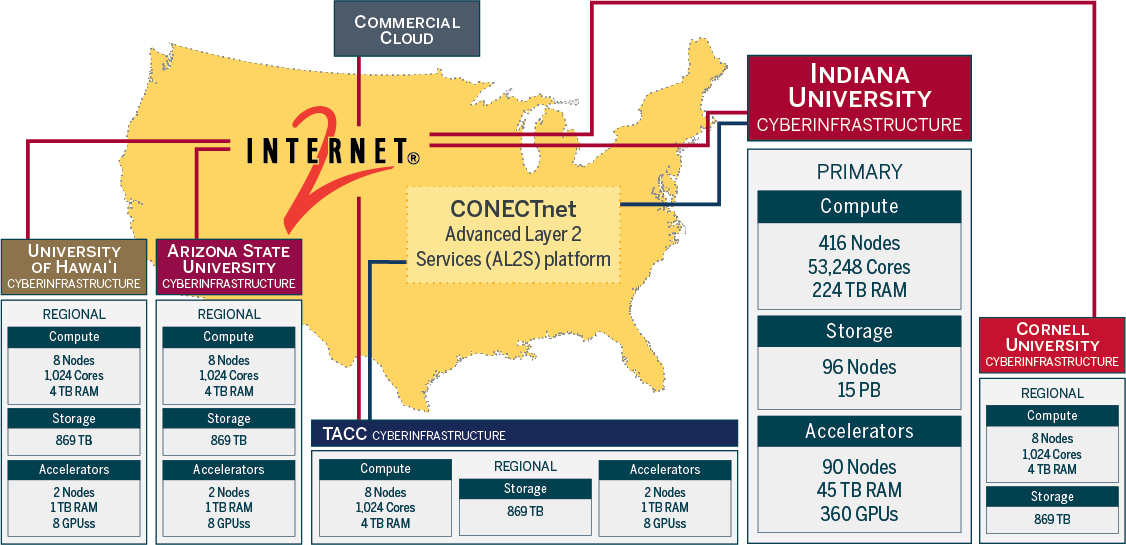
The US public CyVerse primarily runs on hardware located at The University of Arizona, with a full data store mirror at the Texas Advanced Computing Center (TACC), and federated compute resources located across the US.
The full CyVerse SaaS stack can be deployed either on-premises consumer hardware or on cloud resources.
Data storage is managed by an iRODS [![data]{width=25} Data Store](https://docs.cyverse.org/platform/data-store/).
Computing can be done in either the [![de]{width=25} Discovery Environment (DE)](https://docs.cyverse.org/platform/discovery-environment/) data science workbench or with the [![cacao]{width=25} CACAO IaC](https://docs.cyverse.org/platform/cloud/) which leverages both public research computing and commercial cloud.
Event-based triggers are accomplished through the DataWatch API.
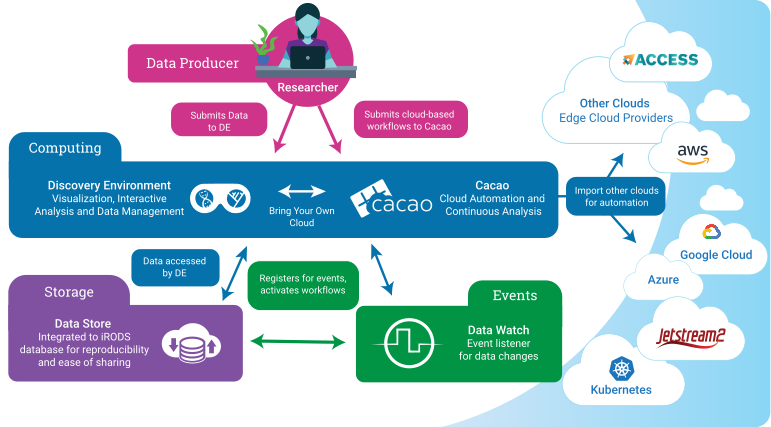{width=800}
CyVerse's Infrastructure as Code (IaC) provides computing, storage, and event-based components researchers rely upon for data intensive science.
!!! tip "Deploying your own"
This document describes the production US CyVerse deployment. For the smallest
useful deployment and its sizing, see
[component inventory](https://docs.cyverse.org/architecture/component-inventory/), and for the ordered build see
[deployment](https://docs.cyverse.org/deployment/).
## :material-api: Application Programming Interfaces (APIs)
All CyVerse APIs are [:simple-openapiinitiative: OpenAPI](https://www.openapis.org/) compliant.
[:material-terrain: Terrain API](https://de.cyverse.org/terrain/docs/index.html){target=_blank} is the main API for Discovery Environment and uses a [:simple-swagger: Swagger](https://swagger.io/) interface.
* [:simple-jupyter: Terrain API Jupyter Notebooks](https://github.com/cyverse/terrain-notebook) - provide an introduction to Terrain and show how to start and stop analyses.
* [:simple-swagger: https://de.cyverse.org/terrain/swagger.json](https://de.cyverse.org/terrain/swagger.json)
[![cacao]{width=25} CACAO API](https://gitlab.com/cyverse/cacao/-/blob/master/docs/openapi/openapi.yaml){target=_blank} - Infrastructure as Code API for cloud automation with OpenAPI
[Data Watch API](https://gitlab.com/cyverse/datawatch/-/blob/master/docs/openapi/datawatch-openapi.yaml){target=_blank} - event based triggers for workflows with OpenAPI
CyVerse public-facing APIs are frequently leveraged by "[Powered-by-CyVerse](https://cyverse.org/powered-by-cyverse)" projects which utilize specific parts of the platform.
## :octicons-cloud-24: Cloud Services
[![][cacao]{width=25}](https://cyverse.org/cacao){target=_blank} [Continuous Automation / Continuous Analysis & Orchestration (CACAO)](https://cyverse.org/cacao){target=_blank} - Infrastructure as Code for multi-cloud deployments
* [:simple-terraform: CACAO Terraform Templates](https://gitlab.com/cyverse/cacao-tf-os-ops/){target=_blank}
* [:octicons-stopwatch-24: DataWatch](https://gitlab.com/cyverse/datawatch){target=_blank} - a notification system for reporting data events
## :material-server: Compute Resources
The DE runs on-premises hardware located at University of Arizona (UArizona) in the UITS colocation space at the high performance computing center. The data store is mirrored nightly at TACC.
CyVerse staff maintain several hundred servers at UArizona and a mirror at TACC. Exact counts change as hardware is added, replaced, or retired.
Hardware is added, replaced, or upgraded every few months. The tables below record the shape of the deployment rather than a current inventory; a dash means the aggregate is not tracked in this document.
**Primary Hardware Specifications**
Compute nodes
| System Configuration | Aggregate information | Per Node (Compute Node) |
|----------------------|-----------------------|-------------------------|
| Machine types | Dell, SuperMicro | |
| Operating systems | Rocky, CentOS | Rocky, CentOS |
| Processor cores | — | varies by generation |
| CPUs | 128, 64, 40, 32, 16 | 1, 2 |
| RAM | — | 256, 128, 64, 32 GiB |
| Network | 100 Gbps to Internet2 | 10 Gpbs to switch |
| Storage | — | varies by node |
GPU nodes
| System Configuration | Aggregate information | Per Node (Compute Node) |
|----------------------|-----------------------|-------------------------|
| Machine types | Dell, SuperMicro | |
| Operating systems | Rocky, CentOS | Rocky, CentOS |
| Processor cores | | 256 |
| CPUs | | 2 |
| RAM | | 1 TB, 512 GB |
| GPUs | NVIDIA (A100 80GB), (Tesla T4 16GB) | 4 |
| Network | 100 Gbps to Internet2 | 10 Gpbs to switch |
| Storage | — | 28 TB SSD, 21 TB NVMe |
Storage resource nodes (44 nodes)
| System Configuration | Aggregate information | Per Node (Compute Node) |
|----------------------|-----------------------|-------------------------|
| Machine types | Dell, SuperMicro | |
| Operating systems | Rocky, CentOS, Ubuntu | Rocky, CentOS, Ubuntu |
| Processor cores | 1,506 | varies by generation |
| CPUs | 128, 64, 40, 32, 16 | 1, 2 |
| RAM | 11 TiB | 256, 128, 64, 32 GiB |
| Network | 100 Gbps to Internet2 | 10 Gpbs to switch |
| Storage | 18 PB | varies by node |
### :simple-kubernetes: Federated Kubernetes Clusters
* CyVerse runs mainly on a locally managed K8s cluster, but it can be federated to other K8s clusters.
* The [National Research Platform](https://nationalresearchplatform.org/){target=_blank} offers federated K8s resources. These resources are currently in development.
### :simple-openstack: OpenStack Cloud
* CyVerse maintains its own OpenStack Cloud (formerly "Atmosphere") for internal use and development of CACAO.
* Jetstream2 is primarily operated at Indiana University, but test clusters are shared across other universities in the US
### :material-server: High Throughput Computing Environments:
{width=250}
DE uses [HTCondor](https://htcondor.org/){target=_blank} for `executable` jobs on CyVerse resources and `osg` jobs on the [OpenScienceGrid](https://opensciencegrid.org){target=_blank}
{width=250}
Federation to the [OpenScienceGrid](https://opensciencegrid.org){target=_blank} can be accomplished in the DE
### :material-server: High Performance Computing Environments
[University of Arizona](https://it.arizona.edu/){target=_blank} resources are colocated with the CyVerse data store and compute clusters
CyVerse is partnered with [Texas Advanced Computing Center (TACC)](https://www.tacc.utexas.edu/){target=_blank} where its data store is replicated nightly. US based researchers can request access to HPC via:
* [ACCESS-CI](https://access-ci.org/){target=_blank}
* [TACC Allocation request](https://portal.tacc.utexas.edu/allocations-overview){target=_blank}
## :octicons-database-24: Data Storage
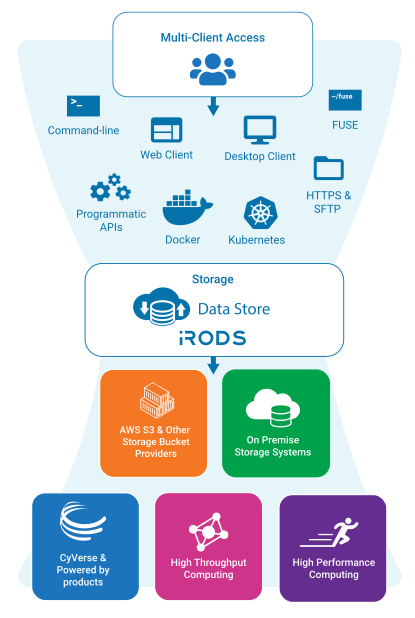
The CyVerse Data Store manages over 6 PB data via [iRODS (integrated Rule Oriented Data System)](https://irods.org){target=_blank} within the `iplant` zone. The zone name is related to the original project name. It is retained to preserve access to data through URLs published during the time period of the original project.
Data storage is organized into resources. The main resource is named `CyVerseRes`, and it holds all user data and most project data. Data on `CyVerseRes` are stored at the University of Arizona. This resource is mirrored with a second resource named `taccRes` which is backed by storage located at the Texas Advanced Computing Center (TACC). There are also special purpose resources dedicated to certain projects. The data in these resources are stored on hardware owned by these projects.
{width=500}
## :material-web: Interfaces
[![][ball]{width=25}](https://user.cyverse.org/){target=_blank} [User Portal](https://user.cyverse.org){target=_blank} - a User Portal for creating and managing accounts, requesting and granting access to platforms, and a user management space for individuals and groups and workshops.
[![][de]{width=25}](https://de.cyverse.org){target=_blank} [Discovery Environment](https://de.cyverse.org){target=_blank} - Custom interactive web based data science workbench
[:material-shield-key: KeyCloak](https://kc.cyverse.org){target=_blank} - federated OAUTH to CyVerse resources, including Google, GitHub, ORCID,& CILogon
[![][data]{width=25}](https://data.cyverse.org){target=_blank} [WebDAV](https://data.cyverse.org/){target=_blank} - A service that provides secure HTTP/WebDAV access to the Data Store. It provides anonymous access to public data and authenticated access to private and shared data.
![][data]{width=25} SFTP - A service that provides secure FTP access to the Data Store. The service can be accessed through sftp://data.cyverse.org.
[![][data]{width=25}](https://datacommons.cyverse.org){target=_blank} [Data Commons](https://datacommons.cyverse.org/){target=_blank} - This service provides secure HTTP access to published datasets that are hosted in the CyVerse Data Store. The Data Commons presents any metadata which have been added by the owners to their datasets.
## :fontawesome-solid-staff-snake: Monitoring Services
[:material-web: Health Status](https://status.cyverse.org/){target=_blank} - system status monitor
[:material-crosshairs-gps: perfSONAR web toolkit](http://206.207.252.45/toolkit/){target=_blank} - network measurement toolkit
---8<--- https://docs.cyverse.org/architecture/component-inventory/
---
type: Reference
title: "Component inventory and sizing"
description: "The components a CyVerse deployment is built from, what each one needs, and what depends on what."
tags: [architecture, sizing, capacity, dependencies]
status: stable
generated: { by: process:okf-migration, at: 2026-07-29T00:00:00Z }
sources:
- id: pilot-record
resource: ../references/pilot-deployment-record.md
title: Pilot CyVerse deployment record
author: process:cyverse-devops
last_modified: 2026-07-29
---
# Components
A minimal CyVerse deployment is five moving parts plus the DE service set:
| Component | Role |
|-----------|------|
| HAProxy | Single public entry point; terminates HTTPS and forwards to cluster node ports |
| PostgreSQL | Catalog (iCAT) database plus one database per DE service |
| RabbitMQ | AMQP message bus between iRODS, the DE, and indexing services |
| iRODS 4.3.3 | Data Store catalog provider and storage vault |
| Discovery Environment | The DE service set, split into non-analysis services and analyses (VICE) |
# Resource requirements
Per-component requirements, as sized for the two-node pilot:
| Component | Cores | Memory | Storage |
|-----------|------:|-------:|--------:|
| HAProxy | 4 | 8 GB | — |
| PostgreSQL | 22 | 56 GB | 510 GB |
| RabbitMQ | 1 | 2 GB | 20 GB |
| iRODS | 20 | 120 GB | 110 TB |
| DE without analyses | 24 | 56 GB | 1.4 TB |
| DE analyses (VICE) | 48 | 192 GB | 3 TB |
!!! note "Storage figure for iRODS"
The pilot record quotes iRODS storage as both 100 TB and 110 TB. 110 TB is
the figure its own totals are computed from, so that is what this table
carries. Treat it as the data vault target for a pilot, not a fixed
requirement — the vault is sized to the science, and is the one number that
grows without bound.
## Two-node allocation
The pilot placed everything except analyses on the first node:
| First node (`core-1`) | Cores | Memory | Storage |
|-----------------------|------:|-------:|--------:|
| Physical capacity | 192 | 2.3 TB | 610 TB |
| Required by HAProxy, PostgreSQL, RabbitMQ | 27 | 66 GB | 530 GB |
| Required by iRODS | 20 | 120 GB | 110 TB |
| Required by DE (no analyses) | 24 | 56 GB | 1.4 TB |
| **Total required** | **71** | **242 GB** | **112 TB** |
| Over-allocation ratio (capacity ÷ required) | 2.7× | 9.5× | 5.4× |
The totals are the exact sums of the rows above them; the pilot record rounded
them to 250 GB and 120 TB, which shifts the storage ratio it quotes from 5.4×
to 5.0×. Nothing downstream depends on the rounding.
Headroom is not left idle. The pilot reserved the surplus by workload so that
one component cannot starve another:
| Reservation | Cores | Memory | Storage |
|-------------|------:|-------:|--------:|
| Scaled iRODS reservation | 54 | 1.2 TB | 550 TB |
| Scaled DE reservation | 65 | 540 GB | 7 TB |
| Unreserved (HAProxy, PostgreSQL, RabbitMQ) | 73 | 560 GB | 53 TB |
The second node carries only DE analyses, and is sized from the DE analyses row
above plus whatever concurrency target the site sets for VICE.
!!! tip "Deriving PostgreSQL settings from this table"
Several `postgresql.conf` values are functions of the memory and cores
reserved for the database rather than of total machine capacity — see
[PostgreSQL tuning](https://docs.cyverse.org/deployment/01-foundation/postgresql/#tuning).
Decide the reservation first, then compute.
# Dependencies
```mermaid
graph TD
PG[PostgreSQL]
MQ[RabbitMQ]
HA[HAProxy]
IRODS[iRODS]
DE[Discovery Environment]
IRODS --> PG
IRODS --> MQ
DE --> HA
DE --> PG
DE --> MQ
DE --> IRODS
```
Read as "depends on":
* **iRODS** → PostgreSQL, RabbitMQ
* **Discovery Environment** → HAProxy, PostgreSQL, RabbitMQ, iRODS
That graph is why the deployment order in
[deployment](https://docs.cyverse.org/deployment/) is what it is: nothing in a later phase
can come up before its dependencies in an earlier one.
# Beyond the pilot
The two-node shape is the smallest useful deployment, not the production
target. Scaling is additive rather than a redesign:
* More VICE capacity means more workers in the `k8s_vice_workers` inventory
group.
* More data capacity means more iRODS resources, which may live on separate
hardware in the same zone.
* Separating PostgreSQL onto its own host is the first split most sites make,
because the DE and the catalog compete for the same buffer cache.
For the shape of the production US CyVerse deployment, see
[system overview](https://docs.cyverse.org/architecture/system-overview/).
---8<--- https://docs.cyverse.org/architecture/network-requirements/
---
type: Reference
title: "Network requirements"
description: "Every port a CyVerse deployment needs open, who needs to reach it, and why."
tags: [architecture, networking, firewall, ports]
status: stable
generated: { by: process:okf-migration, at: 2026-07-29T00:00:00Z }
sources:
- id: pilot-record
resource: ../references/pilot-deployment-record.md
title: Pilot CyVerse deployment record
author: process:cyverse-devops
last_modified: 2026-07-29
---
# How to read this
Open these before installing anything. A closed port in this table shows up
later as a timeout in an Ansible task or a pod stuck in `CrashLoopBackOff`,
several phases away from the cause.
Audience columns use three scopes:
* **Public** — reachable from anywhere users or clients connect from.
* **Internal** — between deployment nodes only.
* **Admin** — from administrator subnets only, never public.
# Public
| Port | Protocol | Service | Notes |
|------|----------|---------|-------|
| 80 | TCP | HAProxy → DE | Redirects to HTTPS |
| 443 | TCP | HAProxy → DE and VICE | Must be reachable from everywhere the DE and VICE are used |
# Data transfer
| Port | Protocol | Service | Reachable from |
|------|----------|---------|----------------|
| 1247 | TCP | iRODS provider | Analysis nodes and any host transferring data in or out |
| 20000–20199 | TCP | iRODS parallel transfer range | Same as above |
| 20000–20199 | UDP | iRODS parallel transfer range | Same as above |
The port range is a configuration choice made at install time; if you narrow it,
narrow it in `server_config.json` and in the firewall together, or transfers
stall after the control connection succeeds.
# Backing services
| Port | Protocol | Service | Reachable from |
|------|----------|---------|----------------|
| 5432 | TCP | PostgreSQL | Both deployment nodes, the pod network, and admin hosts |
| 5672 | TCP | RabbitMQ (AMQP) | Analysis nodes and in-cluster services |
| 15672 | TCP | RabbitMQ management UI | Admin only |
The pod network is not knowable until the cluster exists; see
[phase 4.5](https://docs.cyverse.org/deployment/from-scratch/#45-let-the-pods-reach-postgresql) for
adding the pod CIDR to `pg_hba.conf` after the fact.
# Kubernetes
Control-plane and worker ports for a k0s cluster:
| Port | Protocol | Purpose | Scope |
|------|----------|---------|-------|
| 6443 | TCP | Kubernetes API server | Internal + admin |
| 9443 | TCP | k0s join API | Internal + admin |
| 2380 | TCP | etcd peer traffic | Internal |
| 10250 | TCP | Kubelet metrics | Internal + admin |
| 8132 | TCP | Konnectivity | Internal |
| 179 | TCP | BGP (Calico) | Internal |
| 4789 | UDP | VXLAN (Calico) | Internal |
| — | IP protocol 112 | VRRP (keepalived) | Internal |
| 31343 | TCP | Traefik HTTP node port | Internal, from HAProxy |
| 31344 | TCP | Traefik HTTPS node port | Internal, from HAProxy |
!!! note "Corrections to watch for"
* **VRRP is not a TCP port.** keepalived uses IP protocol 112, so the
firewall rule is a protocol rule, not a port rule. Deployments with a
single control-plane node do not run keepalived at all and can drop it.
* **BGP and VXLAN depend on the CNI configuration.** A single-node control
plane with VXLAN encapsulation may not need `179/tcp`. Confirm against
your own Calico configuration rather than opening it by default.
* **The Traefik node ports are configurable.** If you change them, change
the HAProxy back end to match.
# Outbound
| Destination | Protocol | Purpose |
|-------------|----------|---------|
| DNS provider API | HTTPS | Let's Encrypt DNS-01 challenge for cert-manager |
| Container registries | HTTPS | Pulling service and VICE images |
| Package repositories | HTTPS | OS, iRODS, and Helm chart installation |
Outbound HTTPS to the DNS API is optional in the sense that the deployment
comes up without it, and strongly recommended in the sense that certificate
renewal is otherwise a recurring manual chore.
# Related
* [Component inventory and sizing](https://docs.cyverse.org/architecture/component-inventory/)
* [Ingress deployment](https://docs.cyverse.org/deployment/04-kubernetes/ingress/)
* [Deploying from scratch](https://docs.cyverse.org/deployment/from-scratch/)
---8<--- https://docs.cyverse.org/architecture/namespaces/
---
type: Reference
title: "Kubernetes namespaces"
description: "Namespaces used by a CyVerse Kubernetes deployment and what runs in each one."
tags: [architecture, kubernetes, namespaces]
status: stable
generated: { by: process:okf-migration, at: 2026-07-29T00:00:00Z }
---
# How namespaces are used
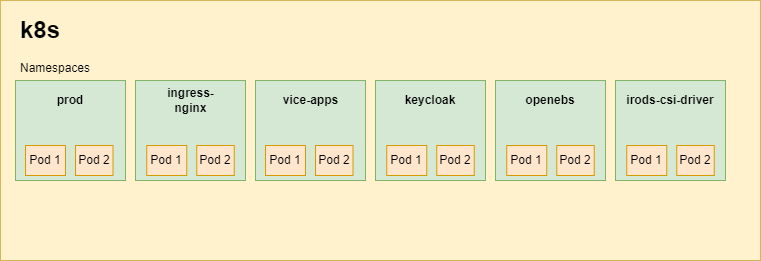
CyVerse groups workloads into namespaces along two lines: what has to be isolated
for security (user containers), and what has its own lifecycle (add-ons that are
installed and upgraded independently of the DE service set).
The DE service namespace is conventionally `prod`. A site running more than one
environment in a cluster names its namespaces after the environments; where a
document in this bundle says ``, that is the choice it refers to.
# The DE service namespace
`prod` in a standard deployment. It holds the DE service set and the supporting
services the DE talks to directly:
| Workload | Document |
|----------|----------|
| DE services (Terrain, apps, analyses, metadata, notifications, search, UI) | [Discovery Environment](https://docs.cyverse.org/deployment/06-applications/discovery-environment/) |
| `de-nginx` front end | [Discovery Environment](https://docs.cyverse.org/deployment/06-applications/discovery-environment/) |
| Redis and Redis HAProxy | [Redis HA](https://docs.cyverse.org/deployment/05-core-services/redis-ha/) |
| Search cluster | [OpenSearch](https://docs.cyverse.org/deployment/05-core-services/opensearch/) |
| Grouper loader and web services | [Grouper](https://docs.cyverse.org/deployment/05-core-services/grouper/) |
| Unleash | [Unleash](https://docs.cyverse.org/deployment/05-core-services/unleash/) |
| NATS | [NATS](https://docs.cyverse.org/deployment/05-core-services/nats/) |
| User Portal (or its own `user-portal` namespace) | [User Portal](https://docs.cyverse.org/deployment/06-applications/user-portal/) |
# Dedicated namespaces
| Namespace | Contents | Why it is separate |
|-----------|----------|--------------------|
| `vice-apps` | Interactive analyses, `app-exposer`, the VICE operator | User-supplied containers need their own network policy and service accounts — see [VICE](https://docs.cyverse.org/deployment/06-applications/vice/) |
| `keycloak` | Keycloak | Authentication is upgraded on its own schedule — see [Keycloak](https://docs.cyverse.org/deployment/05-core-services/keycloak/) |
| `openldap` | OpenLDAP | System of record for accounts — see [OpenLDAP](https://docs.cyverse.org/deployment/05-core-services/openldap/) |
| `irods-csi-driver` | The iRODS CSI driver | Node-level storage plugin with its own upgrade procedure — see [iRODS CSI driver](https://docs.cyverse.org/deployment/05-core-services/irods-csi-driver/) |
| `longhorn-system` | Longhorn | Cluster storage — see [storage](https://docs.cyverse.org/deployment/04-kubernetes/storage/) |
| `openebs` | OpenEBS (legacy) | Older cluster storage — see [storage](https://docs.cyverse.org/deployment/04-kubernetes/storage/) |
| `ingress-nginx` | ingress-nginx | VICE ingresses; being retired — see [ingress](https://docs.cyverse.org/deployment/04-kubernetes/ingress/) |
| `cert-manager` | cert-manager and cluster issuers | TLS issuance — see [cert-manager](https://docs.cyverse.org/deployment/04-kubernetes/cert-manager/) |
| `argo` | Argo Workflows | Batch analyses — see [Argo](https://docs.cyverse.org/deployment/04-kubernetes/argo/) |
| `harbor` | Harbor registry | Registry lifecycle — see [Harbor](https://docs.cyverse.org/deployment/04-kubernetes/harbor/) |
| `mail` | exim4 smarthost | Optional; see [mail](https://docs.cyverse.org/deployment/05-core-services/mail/) |
| `jaeger` | Jaeger collector, query, rollover cron | Optional tracing — see [Jaeger](https://docs.cyverse.org/deployment/05-core-services/jaeger/) |
Which of these exist depends on what you deployed: Longhorn or OpenEBS, OpenSearch
or Elasticsearch, mail and tracing only if installed.
# Practical notes
* **Namespaced manifests.** Several manifests in
[cluster resources](https://docs.cyverse.org/deployment/04-kubernetes/resources/) carry a namespace
in a kustomization or in an argument. Deploying into a namespace other than the
default means changing them; each document flags where.
* **Cross-namespace addresses.** In-cluster names are
`.` — `ldap://openldap.openldap` for the directory,
`http://vice-operator.vice-apps:10000` for the VICE operator.
* **`kubectl` scope.** Most troubleshooting starts with
`kubectl get pods -A`; per-namespace commands in this bundle use ``
wherever the value is a site choice.
# Related
* [System overview](https://docs.cyverse.org/architecture/system-overview/)
* [Deployment](https://docs.cyverse.org/deployment/)
* [Network requirements](https://docs.cyverse.org/architecture/network-requirements/)
---8<--- https://docs.cyverse.org/deployment/from-scratch/
---
type: Playbook
title: "Deploying CyVerse from scratch"
description: "End-to-end walkthrough of a two-node CyVerse pilot deployment, from bare servers to a Discovery Environment running VICE analyses."
tags: [deployment, runbook, pilot, irods, kubernetes, discovery-environment]
status: stable
generated: { by: process:okf-migration, at: 2026-07-29T00:00:00Z }
sources:
- id: pilot-record
resource: ../references/pilot-deployment-record.md
title: Pilot CyVerse deployment record
author: process:cyverse-devops
last_modified: 2026-07-29
- id: irods-install
resource: https://docs.irods.org/4.3.3/getting_started/installation/
title: iRODS 4.3.3 installation guide
author: team:irods-consortium
- id: irods-packages
resource: https://packages.irods.org/
title: iRODS package repository setup
author: team:irods-consortium
- id: ds-collection
resource: https://github.com/cyverse/ds-collection
title: CyVerse Data Store collection (playbooks and iRODS policy)
author: team:cyverse-devops
---
# Scope
This runbook builds a complete, self-contained CyVerse deployment on **two
servers** — the shape used for the most recent pilot. It is the narrative
companion to the per-component procedures under
[deployment](https://docs.cyverse.org/deployment/); every phase below links to the document that
carries the full detail.
A deployment of this size supports a working Discovery Environment (DE) with
VICE analyses, a single-provider iRODS zone, and one PostgreSQL instance shared
by the Data Store and the DE. Scaling out means adding worker nodes and
splitting roles onto more hosts; the order of operations does not change.
!!! info "Placeholders and secrets"
Every site-specific value in this document is a placeholder. Substitute
your own and keep the real values in a **private** inventory repository —
never in this documentation and never in a public repo.
| Placeholder | Meaning | Example |
|-------------|---------|---------|
| `` | DNS domain the deployment is served under | `example.org` |
| `` | Short site name used in realm, client, and account names | `pilot` |
| `core-1` | Node hosting HAProxy, PostgreSQL, RabbitMQ, iRODS, k8s control plane, DE services | `core-1.` |
| `analysis-1` | Node hosting VICE analyses | `analysis-1.` |
| `` | iRODS zone name | `pilotZone` |
| `` | LDAP base DN | `dc=example,dc=org` |
| `` | Your private inventory and group_vars repo | `-deployment` |
| `` | A value you generate per install, never reuse | output of `openssl rand -base64 36` |
Generate every password, salt, zone key, and negotiation key at install
time, for example with `openssl rand -base64 36` (passwords) or
`openssl rand -hex 16` (alphanumeric keys and salts). Store them in the
private inventory, and let Ansible template them into place rather than
typing them into shells where they land in history.
Deployment secrets that Ansible generates for you — the GPG and PEM files
used by Terrain, apps, and iplant-groups — belong in the **private**
inventory repository, not in this one.
# Node layout
Two servers, split by workload rather than by service:
| Node | Runs |
|------|------|
| `core-1` | HAProxy, PostgreSQL, RabbitMQ, iRODS provider, Kubernetes control plane, DE services (everything except analyses) |
| `analysis-1` | Kubernetes worker dedicated to VICE analyses |
Sizing, per-component reservations, and the dependency graph are in
[component inventory](https://docs.cyverse.org/architecture/component-inventory/). The ports that
must be open between the two nodes, to administrators, and to the public
internet are in
[network requirements](https://docs.cyverse.org/architecture/network-requirements/).
Reading the dependency graph from the bottom up gives the order the rest of
this document follows:
```mermaid
graph TD
NET[Phase 0: network and firewalls] --> FOUND[Phase 1: HAProxy, PostgreSQL, RabbitMQ]
FOUND --> DB[Phase 2: service databases]
DB --> IRODS[Phase 3: iRODS provider and DE integration]
IRODS --> K8S[Phase 4: Kubernetes and cluster add-ons]
K8S --> CORE[Phase 5: LDAP, Keycloak, Grouper, OpenSearch, NATS, CSI driver]
CORE --> APPS[Phase 6: DE services, VICE, User Portal]
APPS --> POST[Phase 7: bootstrap admin, VICE operator, apps]
```
# Phase 0: network and firewalls
Do this first. Every later phase fails in a confusing way if a port is closed.
1. Confirm host firewalls on both nodes and any institutional firewall allow
the traffic listed in
[network requirements](https://docs.cyverse.org/architecture/network-requirements/).
2. Confirm `80/tcp` and `443/tcp` on `core-1` are reachable from everywhere
users and VICE clients connect from.
3. Confirm iRODS (`1247/tcp` plus the `20000-20199` data range) is reachable
from `analysis-1` and from any host that will move data in or out.
4. Confirm outbound HTTPS to your DNS provider's API is allowed, so
cert-manager can complete Let's Encrypt DNS-01 challenges. This is optional
but strongly recommended; without it, certificate issuance is manual.
5. Create the DNS records you will need: `de.`,
`keycloak.`, `user.`, `vice.`, and a
wildcard `*.vice.` for interactive apps.
# Phase 1: foundation services on `core-1`
Full procedures: [HAProxy](https://docs.cyverse.org/deployment/01-foundation/haproxy/),
[PostgreSQL](https://docs.cyverse.org/deployment/01-foundation/postgresql/),
[RabbitMQ](https://docs.cyverse.org/deployment/01-foundation/rabbitmq/).
## 1.1 HAProxy
Install HAProxy on `core-1`. It terminates public HTTPS on `443/tcp` and
forwards to the node ports Traefik listens on inside the cluster. Its
configuration depends on the Traefik node ports chosen in Phase 4, so install
the package now and configure it with the `haproxy` playbook tag later in that
phase.
## 1.2 PostgreSQL
One PostgreSQL instance backs both the iRODS catalog (iCAT) and every DE
service database.
1. Disable transparent huge pages: append `transparent_hugepage=never` to
`GRUB_CMDLINE_LINUX_DEFAULT` in `/etc/default/grub`, run `update-grub`, and
reboot.
2. Set kernel parameters persistently (`/etc/sysctl.d/`):
`vm.nr_hugepages = 0.6 * (memory_available_to_postgres_in_kiB / 2048)` and
`vm.swappiness = 5`.
3. Install `postgresql`, `postgresql-client`, and `python3-psycopg2`.
4. Apply the tuned `postgresql.conf` settings from
[PostgreSQL](https://docs.cyverse.org/deployment/01-foundation/postgresql/#tuning) — they derive from the
cores and memory you reserved for the database, so compute them from your
own sizing rather than copying literals.
5. Restart PostgreSQL, then follow the iRODS project's instructions for
preparing PostgreSQL for iRODS.[^irods-install]
6. Create a role for the DE with `SELECT` on all tables in the iCAT database,
with a generated password.
!!! warning "`standard_conforming_strings`"
The DE database expects `standard_conforming_strings = off`. If it is left
on, some migrations do not apply; see
[troubleshooting](https://docs.cyverse.org/deployment/07-post-install/troubleshooting/).
## 1.3 RabbitMQ
1. Install `rabbitmq-server`, enable the `rabbitmq_management` plugin, restart.
2. Create an administrator account with a generated password, grant it full
configure/write/read permissions, and tag it `administrator`.
3. **Delete the default `guest` account.**
4. Create the vhost `/data-store` and grant the administrator full
configure/write/read on it.
5. Create a separate account for iRODS with a generated password and full
configure/write/read on `/data-store`.
6. Create a `topic` exchange named `irods` on `/data-store`.
The DE's own RabbitMQ objects are created later, in Phase 6, by the
`rabbitmq_configure.yml` playbook.
# Phase 2: service databases
Full procedures: [databases](https://docs.cyverse.org/deployment/02-databases/).
The iCAT database itself is created by the iRODS installer in Phase 3. The DE's
databases are created and migrated by Ansible in Phase 4 (the
`setup-databases` and `update-databases` tags), so at this point you only need
to make PostgreSQL reachable:
1. Set a password for the `postgres` role.
2. Edit `pg_hba.conf` to allow connections from your admin hosts and from both
nodes, using method `scram-sha-256`.
3. Restart PostgreSQL.
The pod network cannot be allowed yet — its CIDR does not exist until the
cluster is created. Phase 4 comes back to `pg_hba.conf` for that.
# Phase 3: iRODS provider and DE integration
Full procedures: [iRODS provider](https://docs.cyverse.org/deployment/03-data-store/irods-provider/),
[DE integration](https://docs.cyverse.org/deployment/03-data-store/de-integration/).
## 3.1 Logging first
Create the rsyslog configuration **before** installing iRODS, so the first
server start is captured. Write `/etc/rsyslog.d/00-irods.conf`:
```
$FileCreateMode 0644
$DirCreateMode 0755
$Umask 0000
$template irods_format,"%msg%\n"
:programname,startswith,"irodsServer" /var/log/irods/irods.log;irods_format
& stop
:programname,startswith,"irodsDelayServer" /var/log/irods/irods.log;irods_format
& stop
:programname,startswith,"irodsAgent" /var/log/irods/irods.log;irods_format
& stop
```
Then add log rotation in `/etc/logrotate.d/irods`:
```
/var/log/irods/irods.log {
weekly
rotate 26
copytruncate
delaycompress
compress
dateext
notifempty
missingok
su root root
}
```
## 3.2 Install the iRODS 4.3.3 catalog provider
1. Set TCP keepalive to 120 seconds with `sysctl`.
2. Install `python-is-python3` and `python3-pika`.
3. Add the iRODS apt repository[^irods-packages] and pin `irods-*` to
`4.3.3` so an unattended upgrade cannot move the catalog provider.
4. Run the iRODS setup script[^irods-install] with the answers in
[iRODS provider](https://docs.cyverse.org/deployment/03-data-store/irods-provider/#setup-answers) —
service account `irods`, role `provider`, ODBC driver
`PostgreSQL Unicode`, catalog on `localhost:5432`, zone ``,
port `1247`, data port range `20000-20199`.
Three answers deserve care:
* **Password salt** — a generated alphanumeric string. Never leave it
empty; an empty salt makes stored passwords recoverable.
* **Zone key** and **negotiation key** — generated alphanumeric strings;
the zone key must be under 40 characters.
* **Default resource name** — anything but `demoResc`, with its vault
directory at the root of the filesystem that will hold the data.
## 3.3 Install CyVerse policy
From the [Data Store collection](https://github.com/cyverse/ds-collection)
branch that matches your site,[^ds-collection] as the `irods` service account:
1. Copy `playbooks/files/irods/var/lib/irods/msiExecCmd_bin/*` into
`/var/lib/irods/msiExecCmd_bin/` and make them executable.
2. Render `playbooks/templates/irods/etc/irods/cyverse-env.re.j2` to
`/etc/irods/cyverse-env.re`, setting `cyverse_RE_HOST` to the FQDN of
`core-1` and `cyverse_ZONE` to ``.
3. Copy `playbooks/files/etc/irods/*` into `/etc/irods/`.
Then edit `/etc/irods/server_config.json`:
```json
{
"advanced_settings": {
"number_of_concurrent_delay_rule_executors": 12
},
"environment_variables": {
"IRODS_AMQP_URI": "amqp://:@localhost:5672/%2Fdata-store"
},
"plugin_configuration": {
"rule_engines": [
{ "re_rulebase_set": ["cve", "cyverse_core", "core"] }
]
}
}
```
The rule base order is significant: `cve` overrides `cyverse_core`, which
overrides `core`.
Enable the service so it starts at boot, and start it.
## 3.4 Runtime initialization
As the `irods` service account, with `` substituted throughout:
1. Create the `rodsadmin` group and add `rods` to it. Remove the collections
`//home/rodsadmin` and
`//trash/home/rodsadmin` that group creation leaves behind.
2. Remove `//trash/home/public`.
3. Ensure the predefined collections `/`, `//home`,
`//home/public`, `//home/rods`,
`//trash`, `//trash/home`, and
`//trash/home/rods` all carry time-based (version 1) UUIDs.
4. Grant `rodsadmin` `write` on `/`, `//home`,
`//trash`, and `//trash/home`; grant it `own` on
`//home/rods` and `//trash/home/rods`.
5. Create the `anonymous` `rodsuser` **without** a password and grant it
`read` on `/` and `//home`. This is what makes
public data public.
## 3.5 Prepare iRODS for the DE
1. Install the DE's specific queries from
`playbooks/files/irods/specific-queries` in the Data Store collection. Each
file name is the query alias and the file contents are the query:
```bash
iadmin asq "$(cat IPCCountCollectionsUnderPath.sql)" IPCCountCollectionsUnderPath
```
2. Create the DE's iRODS admin account:
```bash
iadmin mkuser de-irods rodsadmin
iadmin moduser de-irods password ''
iadmin atg rodsadmin de-irods
```
# Phase 4: Kubernetes and cluster add-ons
Full procedures: [cluster](https://docs.cyverse.org/deployment/04-kubernetes/cluster/),
[resources](https://docs.cyverse.org/deployment/04-kubernetes/resources/),
[cert-manager](https://docs.cyverse.org/deployment/04-kubernetes/cert-manager/),
[ingress](https://docs.cyverse.org/deployment/04-kubernetes/ingress/), [storage](https://docs.cyverse.org/deployment/04-kubernetes/storage/),
[Harbor](https://docs.cyverse.org/deployment/04-kubernetes/harbor/), [Argo](https://docs.cyverse.org/deployment/04-kubernetes/argo/).
## 4.1 Inventory and group variables
Start from the example inventory in `ansible/example/inventory` in the
deployment playbook repository and copy it into your private
``:
| Inventory group | Contents for a two-node pilot |
|-----------------|-------------------------------|
| `01_condor` | empty — HTCondor is not used in this deployment |
| `02_dbms` | the database host; both groups may name the same host |
| `03_gocd` | empty — no GoCD in this deployment |
| `04_haproxy` | `core-1` |
| `05_k8s` | `core-1` in `k8s_api_proxy`, `k8s_controllers`, and `k8s_de_workers`; `analysis-1` in `k8s_vice_workers` |
`group_vars/all.yml` in the example inventory is organized in phases, because
some variables can only be filled in from values produced by earlier phases
(Keycloak client secrets, for example). Fill in phases 1 through 4 now.
## 4.2 Databases, node prep, HAProxy
Run from the `ansible` directory of the deployment playbook repository, with
`-i` pointing at your private inventory:
```bash
ansible-playbook -i /path/to/inventory --tags setup-databases,update-databases kubernetes.yml
ansible-playbook -i /path/to/inventory --tags prep-nodes kubernetes.yml
ansible-playbook -i /path/to/inventory --tags haproxy kubernetes.yml
```
The PostgreSQL installation role is skipped here on purpose: the Data Store's
DBMS from Phase 1 is being reused.
## 4.3 Create the k0s cluster
Write a `k0sctl.yaml` listing both hosts and the cluster settings — see
[cluster](https://docs.cyverse.org/deployment/04-kubernetes/cluster/#k0sctlyaml) for a sanitized example — then:
```bash
export K0S_SSH_USER=
export K0S_SSH_KEY_PATH=/path/to/private-key
export KUBECONFIG="$HOME/.kube/config"
mkdir -p "$(dirname "$KUBECONFIG")"
k0sctl apply --config /path/to/k0sctl.yaml
```
Because `core-1` is both control plane and DE worker, remove the control-plane
taint if k0s applied one. On the control node:
```bash
k0s kubectl taint node core-1 node-role.kubernetes.io/control-plane:NoSchedule-
```
If the node was never tainted, the command reports that there is nothing to
remove; that is the expected outcome, not an error to chase.
## 4.4 Cluster add-ons, in order
```bash
ansible-playbook -i /path/to/inventory --tags cert-manager kubernetes.yml
ansible-playbook -i /path/to/inventory --tags cert-issuers kubernetes.yml
ansible-playbook -i /path/to/inventory --tags argo kubernetes.yml
ansible-playbook -i /path/to/inventory argo_resources.yml
ansible-playbook -i /path/to/inventory --tags ingress-nginx kubernetes.yml
ansible-playbook -i /path/to/inventory --tags traefik kubernetes.yml
ansible-playbook -i /path/to/inventory --tags longhorn kubernetes.yml
ansible-playbook -i /path/to/inventory --tags harbor kubernetes.yml
```
!!! note "ingress-nginx is transitional"
Traefik is the ingress the deployment is standardizing on. ingress-nginx is
still installed for VICE ingresses and will be removed once that migration
completes. See [ingress](https://docs.cyverse.org/deployment/04-kubernetes/ingress/).
## 4.5 Let the pods reach PostgreSQL
The cluster now has a pod network, so add it to `pg_hba.conf`:
```bash
kubectl get nodes -o jsonpath='{.items[*].spec.podCIDR}' && echo
```
For each distinct CIDR, add a line to `pg_hba.conf` (in a Debian packaged
PostgreSQL 16 install, `/etc/postgresql/16/main/pg_hba.conf`):
```
host all all scram-sha-256
```
Restart PostgreSQL afterwards. In a single-node-per-role pilot the CIDRs are
usually identical, but check rather than assume.
# Phase 5: core services
Full procedures: [OpenLDAP](https://docs.cyverse.org/deployment/05-core-services/openldap/),
[Keycloak](https://docs.cyverse.org/deployment/05-core-services/keycloak/),
[Grouper](https://docs.cyverse.org/deployment/05-core-services/grouper/),
[OpenSearch](https://docs.cyverse.org/deployment/05-core-services/opensearch/),
[NATS](https://docs.cyverse.org/deployment/05-core-services/nats/),
[iRODS CSI driver](https://docs.cyverse.org/deployment/05-core-services/irods-csi-driver/).
## 5.1 DE prerequisites and directory services
```bash
ansible-playbook -i /path/to/inventory --tags de-reqs kubernetes.yml
ansible-playbook -i /path/to/inventory --tags openldap-docker kubernetes.yml
```
## 5.2 Keycloak
```bash
ansible-playbook -i /path/to/inventory --tags keycloak kubernetes.yml
```
Add a DNS record for `keycloak.` if you have not already. An
`/etc/hosts` entry will get you through the next few steps, but it is not a
deployment.
The realm, LDAP federation, mappers, roles, and eight OAuth clients are then
configured in the Keycloak UI. That configuration is long, exact, and produces
the client secrets that later phases need in `group_vars/all.yml`, so it lives
in its own document: [Keycloak](https://docs.cyverse.org/deployment/05-core-services/keycloak/). Complete it
before continuing.
## 5.3 Service signing keys
From the same directory you run `ansible-playbook` from:
```bash
./scripts/generate-secrets.sh /path/to/inventory
```
This writes the GPG and PEM files Terrain, apps, and iplant-groups expect, and
prints a YAML snippet to add to `group_vars/all.yml`. Commit the generated key
material to your **private** inventory repository only.
## 5.4 Configuration, ingress, networking, messaging
```bash
ansible-playbook -i /path/to/inventory \
--tags=configure-services,ingress,networking,nats kubernetes.yml
```
If NATS has to be reinstalled, Helm may still hold a release record; remove it
with `helm -n prod uninstall nats` before re-running.
## 5.5 Scheduling, caching, search, groups, storage
```bash
ansible-playbook -i /path/to/inventory \
--tags=feature-discovery,image-cache,grouper kubernetes.yml
ansible-playbook -i /path/to/inventory --tags=opensearch kubernetes.yml
ansible-playbook -i /path/to/inventory --tags=irods-csi-driver kubernetes.yml
```
Node feature discovery labels nodes by capability (GPUs, for instance) so apps
that need specific hardware land on the right worker. Image caching pre-pulls
frequently used VICE images so interactive apps start promptly.
## 5.6 DE messaging objects
```bash
ansible-playbook -i /path/to/inventory rabbitmq_configure.yml
```
# Phase 6: applications
Full procedures:
[Discovery Environment](https://docs.cyverse.org/deployment/06-applications/discovery-environment/),
[VICE](https://docs.cyverse.org/deployment/06-applications/vice/),
[User Portal](https://docs.cyverse.org/deployment/06-applications/user-portal/).
```bash
ansible-playbook -i /path/to/inventory --tags=deploy-all-services kubernetes.yml
```
This deploys the full DE service set, the User Portal, and the VICE backend.
Watch for pods that never reach `Running`:
```bash
kubectl get pods -A | grep -Ev 'Running|Completed'
```
# Phase 7: bootstrap and first analyses
Full procedures: [bootstrap](https://docs.cyverse.org/deployment/07-post-install/bootstrap/),
[verification](https://docs.cyverse.org/deployment/07-post-install/verification/),
[troubleshooting](https://docs.cyverse.org/deployment/07-post-install/troubleshooting/).
## 7.1 Bootstrap portal administrator
```bash
ansible-playbook -i /path/to/inventory bootstrap_portal_admin.yml
```
Run this from a host that can both `kubectl port-forward` into the cluster and
reach the portal database with `psql`. The playbook port-forwards to OpenLDAP
and portal-conductor and connects to the portal database directly, so a
`pg_hba.conf` rule for that host has to exist. Getting this far means the
port-forwarding half already works; the database half is the one that bites.
This creates the `-bootstrap` user, the account you use for everything
below.
## 7.2 Register a VICE operator
Interactive analyses will not launch until an operator is registered.
1. Log in to `https://de.` as `-bootstrap`.
2. Open the left navigation from the hamburger menu, then
**Admin → VICE → Operators**.
3. Click **+New** and set:
* **Name**: `prod`
* **URL**: `http://vice-operator.vice-apps:10000` — plain HTTP is correct
here; the connection never leaves the cluster network.
* **Public base URL**: `https://vice.`
* **Priority**: `0`
4. Click **Register operator**.
## 7.3 Import a starting set of apps
The `scripts/appei` directory of the deployment repository exports and imports
apps and tools between DEs, and manages its dependencies with
[uv](https://docs.astral.sh/uv/). From that directory:
```bash
uv run appei login --server de. --username -bootstrap
uv run appei import --server de. -i de-word-count.json --publish
uv run appei import --server de. -i cloudshell.json --featured
uv run appei import --server de. -i portal-delete-user.json
```
The result, as `-bootstrap`:
| App | Visibility |
|-----|------------|
| DE Word Count | public, not featured |
| Cloud Shell | featured, and therefore public |
| portal-delete-user | private to the bootstrap account |
`portal-delete-user` needs a configuration file attached before it will run;
[bootstrap](https://docs.cyverse.org/deployment/07-post-install/bootstrap/#portal-delete-user) covers that,
and [troubleshooting](https://docs.cyverse.org/deployment/07-post-install/troubleshooting/) covers repairing
the import if it lands with the wrong visibility.
## 7.4 Verify
Work through [verification](https://docs.cyverse.org/deployment/07-post-install/verification/): sign in
through Keycloak, browse the Data Store, run the DE Word Count app on a small
input, and launch Cloud Shell to confirm VICE end to end.
[^irods-install]: https://docs.cyverse.org/deployment/iRODS 4.3.3 installation guide
[^irods-packages]: https://docs.cyverse.org/deployment/iRODS package repository setup
[^ds-collection]: https://docs.cyverse.org/deployment/CyVerse Data Store collection (playbooks and iRODS policy)
[^pilot-record]: https://docs.cyverse.org/deployment/Pilot CyVerse deployment record
---8<--- https://docs.cyverse.org/deployment/planning/prerequisites/
---
type: Reference
title: "Prerequisites"
description: "Hardware, skills, tooling, and access you need in place before deploying CyVerse."
tags: [deployment, planning, prerequisites]
status: stable
generated: { by: process:okf-migration, at: 2026-07-29T00:00:00Z }
---
# Before you start
CyVerse is a full-stack cyberinfrastructure: a data platform, an authentication
stack, a Kubernetes cluster, and a dozen services on top. Deploying it is a
project, not an afternoon. This document is the readiness check; the ordered
procedure is in [deployment](https://docs.cyverse.org/deployment/), and the narrative walkthrough of a
real two-node build is [deploying from scratch](https://docs.cyverse.org/deployment/from-scratch/).
# Infrastructure
!!! success "Hardware or cloud"
* Bare metal, an OpenStack cloud, or a commercial provider.
* Enough capacity for the components in
[component inventory](https://docs.cyverse.org/architecture/component-inventory/). The
smallest useful deployment is two well-provisioned servers; a production
deployment is a cluster.
* Storage for the iRODS vault, sized to the science rather than to a
recommendation, plus persistent volumes for the cluster's stateful
services.
* Public IP addresses, and DNS you can create records in — including a
wildcard for VICE.
* API access to your DNS provider, for automated certificate issuance.
!!! success "Network"
* The ports in
[network requirements](https://docs.cyverse.org/architecture/network-requirements/), open
before you begin rather than debugged later.
* Institutional firewall changes agreed in advance. On a university network
this is usually the longest lead time in the whole project.
* Experience operating in a
[Science DMZ](https://en.wikipedia.org/wiki/Science_DMZ_Network_Architecture)
architecture helps: high-throughput data transfer and segmented services
are exactly what this stack needs.
# Skills
* Linux system administration, including filesystem permissions and systemd.
* Kubernetes cluster operation — not just `kubectl apply`, but reading events,
debugging pod networking, and understanding storage classes.
* Ansible for configuration management.
* PostgreSQL administration and tuning.
* Container fundamentals and registry management.
* DNS, TLS, load balancing, and ingress.
* iRODS concepts: zones, resources, vaults, and the catalog.
Nobody has all of these in equal measure. What matters is that the deployment
team as a whole does, and that whoever runs it can tell a configuration error
from a network error from a policy error.
# Tooling
On the workstation you deploy from:
| Tool | Used for |
|------|----------|
| `ansible` | Everything the playbooks do |
| `kubectl`, `helm` | Cluster operations, chart installs |
| `k0sctl` | Creating and upgrading the cluster |
| `git` | The deployment and inventory repositories |
| `psql` | Database work, including bootstrap steps |
| `uv` | The `appei` app import and export tool |
| `gomplate` | Rendering the configuration and secret templates |
| `skaffold` | Building and deploying individual services during development |
Setup instructions: [Ansible](https://docs.cyverse.org/deployment/planning/ansible/), [Docker](https://docs.cyverse.org/deployment/planning/docker/).
# Access
* `ssh` to every node, key-based, with `sudo`.
* A **private** git repository for the inventory, `group_vars`, and generated key
material. Nothing in this list belongs in a public repository.
* A container registry you control — see [Harbor](https://docs.cyverse.org/deployment/04-kubernetes/harbor/).
* Administrative access to the DNS zone.
!!! danger "Secrets discipline, decided up front"
A CyVerse deployment generates a lot of secrets: database passwords, an iRODS
zone key, a negotiation key, a password salt, eight Keycloak client secrets,
GPG and PEM signing keys, registry credentials, and DNS API tokens.
Decide where they live before you generate the first one. The pattern that
works is: generate at install time, store in the private inventory repository,
template into place with Ansible, and never paste into a shell.
# Temperament
Distributed systems fail in layers, and this one has many. The single most useful
habit is to verify each phase before starting the next — which is what the phase
order in [deployment](https://docs.cyverse.org/deployment/) is for, and why
[verification](https://docs.cyverse.org/deployment/07-post-install/verification/) exists as its own document.
# Next
* [Deployment overview and order](https://docs.cyverse.org/deployment/)
* [Deploying from scratch](https://docs.cyverse.org/deployment/from-scratch/)
* [Component inventory and sizing](https://docs.cyverse.org/architecture/component-inventory/)
* [Network requirements](https://docs.cyverse.org/architecture/network-requirements/)
---8<--- https://docs.cyverse.org/deployment/planning/ansible/
---
type: Deployment Procedure
title: "Ansible"
description: "Installing Ansible and the inventory, group_vars, and playbook conventions the CyVerse deployment expects."
tags: [deployment, planning, ansible, automation]
status: stable
generated: { by: process:okf-migration, at: 2026-07-29T00:00:00Z }
sources:
- id: ansible-docs
resource: https://docs.ansible.com/ansible/latest/
title: Ansible documentation
author: team:ansible
---
# How CyVerse uses Ansible
[Ansible](https://www.ansible.com/) is agentless: it runs from your workstation
over `ssh` and needs nothing installed on the servers. CyVerse uses it for
everything from host preparation to deploying the DE service set, driven by tags
on a single `kubernetes.yml` playbook plus a handful of standalone playbooks.
Read the [Ansible documentation](https://docs.ansible.com/ansible/latest/) if you
have not used it before — this document covers only the CyVerse conventions.
# Install
Any of these works; pick whichever your workstation already manages packages
with:
```bash
# pip
pip install --user ansible
# homebrew
brew install ansible
# distribution package
apt-get install ansible
```
## Third-party roles
Some playbooks depend on roles from Ansible Galaxy. From the playbook repository:
```bash
ansible-galaxy install --force -r requirements.yaml
```
# Configuration
CyVerse's variables are structured as YAML hashes, and overriding a single key
inside one requires hash merging rather than replacement:
```bash
export ANSIBLE_HASH_BEHAVIOUR="merge"
```
Set it in your shell profile, or set `hash_behaviour = merge` in a local
`ansible.cfg` — the second is more reliable, because it travels with the
repository instead of with your shell.
# Inventory layout
Inventories are **not** in the public repository, and files matching `*.cfg` in
the inventories directory are gitignored deliberately: an inventory names every
host in the deployment.
Keep yours in a private repository. Start from the example inventory shipped with
the playbooks and fill in the groups; for the two-node pilot shape, see
[cluster](https://docs.cyverse.org/deployment/04-kubernetes/cluster/#inventory).
## group_vars
The default variables live in `inventories/group_vars/all` in the playbook
repository, with every variable the roles use set to a default. You create your
own `group_vars/all.yml` in your inventory and override only what differs.
The example file is organized **in phases**, and that ordering is meaningful: some
variables cannot be filled in until earlier phases have produced their values.
The clearest case is Keycloak — its eight client secrets do not exist until the
clients have been created in the running Keycloak, so phase 5 variables are filled
in partway through the deployment. Fill in phases 1 through 4 before starting, and
expect to come back.
# Playbook layout
The repository diverges from Ansible's recommended layout in two documented ways:
* **`group_vars` location.** In `inventories/group_vars` rather than beside the
playbooks, so that inventories carry their own variables.
* **Role-separated playbooks.** Kept in `playbooks/`; what sits in the top level
of `ansible/` is composite or one-off playbooks. To run a single role, use the
`single-role.yaml` playbook — its own comments document its use.
# Running playbooks
```bash
# check every host is reachable
ansible -i /path/to/inventory -m ping all
# run a phase by tag
ansible-playbook -i /path/to/inventory --tags prep-nodes kubernetes.yml
# a standalone playbook
ansible-playbook -i /path/to/inventory rabbitmq_configure.yml
```
Useful flags: `-K` to prompt for the `sudo` password, `-u ` to override the
remote user, `--check` for a dry run, and `--diff` to see what would change.
# Preparing servers
Modern targets need little preparation beyond what `prep-nodes` does. Two
requirements are worth knowing about because their failure mode is a confusing
Ansible error rather than a clear one:
* **Python 3 on every host**, which is what Ansible's modules run under.
* **`python3-psycopg2` on the database host**, which the PostgreSQL modules
import.
Older CyVerse notes also call for `python-simplejson`, `python-httplib2`, and
`curl` on CentOS 5/6 and early Ubuntu hosts. Those instructions apply only to
distributions that are now end of life; on a current OS the packages above are
enough.
# SSH access
```bash
# generate a key if you do not have one
ssh-keygen -t ed25519
# install it on each host
ssh-copy-id -i ~/.ssh/id_ed25519.pub @
```
Then `ssh` to each host once by fully qualified name, so its host key lands in
`~/.ssh/known_hosts` — Ansible fails on an unknown host key, and doing this
up front turns a run-time failure into a five-minute setup step. An `~/.ssh/config`
entry per host saves typing later.
`ed25519` is the current default; older notes generate RSA keys, which still work
but are no longer the recommendation.
# Related
* [Docker-based setup](https://docs.cyverse.org/deployment/planning/docker/)
* [Cluster](https://docs.cyverse.org/deployment/04-kubernetes/cluster/)
* [Cluster resources](https://docs.cyverse.org/deployment/04-kubernetes/resources/)
* [Database migrations](https://docs.cyverse.org/deployment/02-databases/migrations/)
---8<--- https://docs.cyverse.org/deployment/planning/docker/
---
type: Deployment Procedure
title: "Docker"
description: "Installing Docker and running the deployment playbooks from inside a container."
tags: [deployment, planning, docker, containers]
status: stable
generated: { by: process:okf-migration, at: 2026-07-29T00:00:00Z }
sources:
- id: docker-docs
resource: https://docs.docker.com/engine/install/
title: Docker Engine installation
author: team:docker
---
# Install
Follow the [Docker Engine installation
guide](https://docs.docker.com/engine/install/) for your platform. On macOS and
Windows that means Docker Desktop; on Linux, the distribution packages or Docker's
own repository.
You need Docker for two unrelated reasons: building service and tool images, and —
optionally — running the deployment playbooks in a container instead of installing
Ansible on your workstation.
# Running the playbooks in a container
The deployment repository includes a `Dockerfile` at the top level that builds an
image capable of running the playbooks. It is useful when your workstation cannot
easily run the Ansible version the playbooks expect.
```bash
# generate the SSH configuration the image expects
./create-ssh-configs.sh
# build the image
docker build -t cyverse-ansible .
# run the playbooks with the working tree mounted
docker run --rm -it -v "$(pwd)":/ansible -w /ansible cyverse-ansible /bin/bash
```
From the shell inside the container, run `ansible-playbook` as usual; see
[Ansible](https://docs.cyverse.org/deployment/planning/ansible/).
!!! danger "Never push this image"
The build embeds your SSH configuration, and a run mounts your inventory. That
image is a copy of your credentials, and pushing it to any registry publishes
them. Build it locally, use it locally, and do not tag it for a registry.
# Related
* [Ansible](https://docs.cyverse.org/deployment/planning/ansible/)
* [Harbor](https://docs.cyverse.org/deployment/04-kubernetes/harbor/)
* [Prerequisites](https://docs.cyverse.org/deployment/planning/prerequisites/)
---8<--- https://docs.cyverse.org/deployment/01-foundation/haproxy/
---
type: Deployment Procedure
title: "HAProxy"
description: "The public entry point that terminates HTTPS and forwards to the cluster's Traefik node ports."
tags: [deployment, foundation, haproxy, networking]
status: stable
generated: { by: process:okf-migration, at: 2026-07-29T00:00:00Z }
sources:
- id: pilot-record
resource: ../../references/pilot-deployment-record.md
title: Pilot CyVerse deployment record
author: process:cyverse-devops
last_modified: 2026-07-29
- id: haproxy-docs
resource: https://docs.haproxy.org/
title: HAProxy documentation
author: team:haproxy
---
# Role in the deployment
HAProxy is the single public entry point. It listens on `80/tcp` and `443/tcp`
and forwards to the node ports Traefik exposes inside the Kubernetes cluster.
Everything a user or a VICE client reaches — the DE, the User Portal, Keycloak,
interactive app URLs — arrives through it.
In the production US deployment, a second HAProxy fronts the Data Store's
access services (`data.cyverse.org`) as described in
[Data Store](https://docs.cyverse.org/platform/data-store/); a pilot deployment usually runs
only the DE-facing instance.
# Order of operations
HAProxy is installed early, in phase 1, because it is a plain package install
with no dependencies. It is **configured** later, in phase 4, because its back
ends are the Traefik node ports, which do not exist until the cluster does.
1. **Phase 1** — install the `haproxy` package on the node in the
`04_haproxy` inventory group.
2. **Phase 4** — after the cluster is up and Traefik is installed, apply the
configuration:
```bash
ansible-playbook -i /path/to/inventory --tags haproxy kubernetes.yml
```
Sizing: 4 cores, 8 GB memory, no dedicated storage. See
[component inventory](https://docs.cyverse.org/architecture/component-inventory/).
# What the configuration has to line up with
| HAProxy front end | Back end |
|-------------------|----------|
| `80/tcp` | Redirect to HTTPS |
| `443/tcp` | Traefik HTTPS node port, `31344/tcp` by default |
| (optional) plain HTTP passthrough | Traefik HTTP node port, `31343/tcp` by default |
Both node ports are configurable. If you change them in the Traefik values, the
HAProxy back end has to change with them — a mismatch here produces a
connection refused on the public address while every pod looks healthy.
# TLS
Certificates are issued in-cluster by cert-manager, and Traefik terminates TLS
for in-cluster routes. Where HAProxy terminates TLS itself, its certificate has
to be renewed alongside the cluster issuer, and its trust store has to contain
the CA that signed the back-end certificates — a private CA in a pilot means
adding that CA to the system bundle on the HAProxy host.
# Related
* [Network requirements](https://docs.cyverse.org/architecture/network-requirements/)
* [Ingress](https://docs.cyverse.org/deployment/04-kubernetes/ingress/)
* [Deploying from scratch](https://docs.cyverse.org/deployment/from-scratch/#11-haproxy)
---8<--- https://docs.cyverse.org/deployment/01-foundation/postgresql/
---
type: Deployment Procedure
title: "PostgreSQL"
description: "Installing and tuning the PostgreSQL server that backs the iRODS catalog and every CyVerse service database."
tags: [deployment, foundation, postgresql, database]
status: stable
generated: { by: process:okf-migration, at: 2026-07-29T00:00:00Z }
sources:
- id: pilot-record
resource: ../../references/pilot-deployment-record.md
title: Pilot CyVerse deployment record
author: process:cyverse-devops
last_modified: 2026-07-29
- id: irods-install
resource: https://docs.irods.org/4.3.3/getting_started/installation/
title: iRODS 4.3.3 installation guide
author: team:irods-consortium
- id: postgres-docs
resource: https://www.postgresql.org/docs/
title: PostgreSQL documentation
author: team:postgresql
---
# Role in the deployment
One PostgreSQL instance carries two very different workloads:
* the **iRODS catalog (iCAT)**, which is latency-sensitive and touched by every
data operation, and
* the **DE service databases**, which are created and migrated by Ansible.
Because both live in the same instance in a pilot, tuning is sized against the
memory and cores you deliberately reserve for the database — not against the
machine's total capacity. Decide that reservation first, from
[component inventory](https://docs.cyverse.org/architecture/component-inventory/) (the pilot
reserved 22 cores and 56 GB), then compute the settings below from it.
Separating the catalog onto its own instance is the first split most sites make
as they grow, because the DE and the catalog otherwise compete for the same
buffer cache.
# Host preparation
## Transparent huge pages
PostgreSQL uses explicit huge pages; transparent huge pages cause latency
spikes and have to be off.
1. Append `transparent_hugepage=never` to `GRUB_CMDLINE_LINUX_DEFAULT` in
`/etc/default/grub`.
2. Run `update-grub` to write the boot loader configuration.
3. Reboot for the change to take effect.
## Kernel parameters
Persist these (`/etc/sysctl.d/`), do not just `sysctl -w` them:
| Parameter | Value |
|-----------|-------|
| `vm.nr_hugepages` | `0.6 × (memory_available_to_postgres_in_kiB ÷ 2048)` |
| `vm.swappiness` | `5` |
The huge pages figure reserves roughly 60% of the database's memory allocation
as 2 MiB pages, which is what `shared_buffers` plus overhead needs when
`huge_pages = on`.
## Packages
Install `postgresql`, `postgresql-client`, and `python3-psycopg2` — the last one
so Ansible's PostgreSQL modules can talk to the instance. The pilot ran
PostgreSQL 16 from the distribution packages, which puts configuration in
`/etc/postgresql/16/main/`.
# Tuning
Substitute your own reservation for `M` (memory available to PostgreSQL, in
kiB) and `C` (cores available to PostgreSQL):
| Setting | Value | Why |
|---------|-------|-----|
| `max_connections` | `300` | Estimated by the deployment team for the DE service set plus iRODS agents |
| `shared_buffers` | `M ÷ 4` kB | Conventional quarter-of-memory starting point |
| `huge_pages` | `on` | Pairs with `vm.nr_hugepages` above |
| `work_mem` | `150MB` | Starting point only; tune against real query plans |
| `maintenance_work_mem` | `2GB` | Keeps index builds and vacuums off disk |
| `effective_io_concurrency` | `200` | Assumes SSD or NVMe storage |
| `max_worker_processes` | `C` | |
| `max_parallel_maintenance_workers` | `C` | |
| `max_parallel_workers_per_gather` | `C` | |
| `max_parallel_workers` | `C` | |
| `checkpoint_timeout` | `15min` | Fewer, larger checkpoints |
| `max_wal_size` | `4GB` | |
| `min_wal_size` | `1GB` | |
| `random_page_cost` | `1.1` | Assumes SSD or NVMe storage |
| `effective_cache_size` | `M ÷ 2` kB | What the planner assumes the OS caches |
| `shared_preload_libraries` | `'pg_stat_statements'` | Query-level visibility |
| `pg_stat_statements.max` | `10000` | |
| `pg_stat_statements.track` | `all` | |
| `standard_conforming_strings` | `off` | Required by the DE database |
| `listen_addresses` | `'*'` | Needed for cluster pods and the other node |
!!! warning "`work_mem` is per sort, not per connection"
With `max_connections = 300`, a plan with several concurrent sorts can
multiply `work_mem` well past what you expect. Treat `150MB` as a starting
point and lower it if the instance starts swapping.
!!! warning "`standard_conforming_strings = off`"
The DE database expects this off. Leaving it on causes some migrations to be
skipped; re-running the `update-databases` tag after fixing it picks them
up. See [troubleshooting](https://docs.cyverse.org/deployment/07-post-install/troubleshooting/).
Restart PostgreSQL after editing `postgresql.conf`.
# Prepare for iRODS
Follow the iRODS project's instructions for preparing PostgreSQL for
iRODS,[^irods-install] which cover creating the catalog database, the `irods`
role, and its ODBC connectivity. Then create a role for the DE with a generated
password and `SELECT` on all tables in the catalog database — the DE reads the
catalog directly for some listings and never writes to it.
# Access control
`pg_hba.conf` is edited twice, in two different phases:
1. **Phase 2**, before the cluster exists: allow your admin host or hosts and
both deployment nodes, with method `scram-sha-256`.
2. **Phase 4**, once the cluster exists: add the Kubernetes pod CIDR or CIDRs,
because the DE services connect from pods:
```bash
kubectl get nodes -o jsonpath='{.items[*].spec.podCIDR}' && echo
```
For each distinct CIDR add:
```
host all all scram-sha-256
```
Restart PostgreSQL after each change.
!!! danger "Do not use `trust`, and prefer `scram-sha-256` over `md5`"
Older CyVerse deployment notes used `md5`. New deployments should use
`scram-sha-256` throughout: it is the default from PostgreSQL 14 onward, and
`md5` is deprecated upstream.
# Databases and their owners
Created in [phase 2](https://docs.cyverse.org/deployment/02-databases/), listed here because they all
live in this instance:
| Database | Owner role |
|----------|------------|
| iCAT (name chosen at iRODS install time) | `irods` |
| `de` | `de` |
| `notifications` | `de` |
| `metadata` | `de` |
| `qms` | `de` |
| `unleash` | `unleash` |
| `grouper` | `grouper` |
| `portal` | `portal_db_reader` |
| `keycloak` | `keycloak` |
!!! note "Merged databases"
The former `permissions` database has been merged into the DE database. A
deployment created from current playbooks will not have a separate
`permissions` database, and older configuration that refers to one is stale.
# Related
* [Service databases](https://docs.cyverse.org/deployment/02-databases/)
* [Database migrations](https://docs.cyverse.org/deployment/02-databases/migrations/)
* [iRODS provider](https://docs.cyverse.org/deployment/03-data-store/irods-provider/)
* [Deploying from scratch](https://docs.cyverse.org/deployment/from-scratch/#12-postgresql)
[^irods-install]: https://docs.cyverse.org/deployment/01-foundation/iRODS 4.3.3 installation guide
---8<--- https://docs.cyverse.org/deployment/01-foundation/rabbitmq/
---
type: Deployment Procedure
title: "RabbitMQ"
description: "Installing the AMQP broker, creating the Data Store vhost and accounts, and reindexing search from the message bus."
tags: [deployment, foundation, rabbitmq, amqp]
status: stable
generated: { by: process:okf-migration, at: 2026-07-29T00:00:00Z }
sources:
- id: pilot-record
resource: ../../references/pilot-deployment-record.md
title: Pilot CyVerse deployment record
author: process:cyverse-devops
last_modified: 2026-07-29
- id: rabbitmq-docs
resource: https://www.rabbitmq.com/docs
title: RabbitMQ documentation
author: team:rabbitmq
---
# Role in the deployment
RabbitMQ is the message bus between iRODS and the DE. iRODS publishes data
events to it; DE services consume them to keep search indexes and notifications
current. It is also how a full search reindex is triggered.
It is a host service, not a Kubernetes workload — it is installed on the node in
phase 1, before anything that depends on it. Sizing is modest: 1 core, 2 GB
memory, 20 GB storage.
# Install and configure
Run on the foundation node (`core-1`):
1. Install `rabbitmq-server` with the OS package manager.
2. Enable the management plugin and restart the service:
```bash
rabbitmq-plugins enable rabbitmq_management
systemctl restart rabbitmq-server
```
3. Create an administrator account with a generated password, grant it full
configure, write, and read permissions, and tag it `administrator`.
4. **Delete the default `guest` account.** It ships with well-known credentials.
5. Create the vhost `/data-store` and grant the administrator full configure,
write, and read permissions on it.
6. Create a separate account for iRODS with its own generated password and full
configure, write, and read permissions on `/data-store` — iRODS should not
authenticate as the administrator.
7. Create a `topic` exchange named `irods` on `/data-store`.
The iRODS account's credentials go into `IRODS_AMQP_URI` in
`/etc/irods/server_config.json`; see
[iRODS provider](https://docs.cyverse.org/deployment/03-data-store/irods-provider/).
The DE's own vhost, exchange, and accounts are created later, in phase 6, by
the deployment repository's `rabbitmq_configure.yml` playbook:
```bash
ansible-playbook -i /path/to/inventory rabbitmq_configure.yml
```
The existing Data Store playbooks (`playbooks/amqp.yml`,
`playbooks/amqp_exchange.yml` in the
[Data Store collection](https://github.com/cyverse/ds-collection)) automate
steps 1 through 7 and are worth reusing rather than doing this by hand.
# Ports
| Port | Purpose | Scope |
|------|---------|-------|
| 5672 | AMQP | Analysis nodes and in-cluster services |
| 15672 | Management UI and `rabbitmqadmin` download | Administrators only |
Do not expose `15672` publicly. See
[network requirements](https://docs.cyverse.org/architecture/network-requirements/).
# Operations: reindex search
A full reindex is requested by publishing an empty message with the routing key
`index.all` to the DE exchange, then restarting the indexer.
## One-time: get `rabbitmqadmin`
`rabbitmqadmin` is served by the management plugin, so fetch it from the broker
host itself:
```bash
ssh
mkdir -p ~/adm && cd ~/adm
wget http://localhost:15672/cli/rabbitmqadmin
chmod +x rabbitmqadmin
```
## Trigger the reindex
Replace ``, ``, and `` with the values for the
environment you are working in — the DE vhost and user come from the deployment
group variables, and the namespace is where the DE services run (`prod` in a
standard deployment).
```bash
# check the broker is healthy
systemctl status rabbitmq-server.service -l
# read the password into the environment instead of putting it in shell history
read -rs PASSWORD && export PASSWORD
# confirm you are pointed at the right vhost
./rabbitmqadmin -V list exchanges -u -p "$PASSWORD"
# request a full reindex
./rabbitmqadmin publish -V -u -p "$PASSWORD" \
exchange=de routing_key=index.all payload=""
# restart the indexer so it picks the request up
kubectl rollout restart deployment infosquito2 -n
```
If `infosquito2` is not deployed at all, deploy it rather than restarting it —
see [cluster resources](https://docs.cyverse.org/deployment/04-kubernetes/resources/).
A reindex reads the entire catalog. On a large zone it takes hours and adds load
to both PostgreSQL and the search cluster, so run it deliberately.
# Related
* [OpenSearch](https://docs.cyverse.org/deployment/05-core-services/opensearch/)
* [Elasticsearch (legacy)](https://docs.cyverse.org/deployment/05-core-services/elasticsearch/)
* [iRODS provider](https://docs.cyverse.org/deployment/03-data-store/irods-provider/)
* [Deploying from scratch](https://docs.cyverse.org/deployment/from-scratch/#13-rabbitmq)
---8<--- https://docs.cyverse.org/deployment/02-databases/migrations/
---
type: Deployment Procedure
title: "Database migrations"
description: "The shared golang-migrate procedure used to create and update every CyVerse service schema."
tags: [deployment, databases, migrations, postgresql]
status: stable
generated: { by: process:okf-migration, at: 2026-07-29T00:00:00Z }
sources:
- id: golang-migrate
resource: https://github.com/golang-migrate/migrate
title: golang-migrate
author: team:golang-migrate
---
# Two ways to migrate
Every CyVerse schema is versioned as a directory of `migrations` applied with
[golang-migrate](https://github.com/golang-migrate/migrate).[^golang-migrate] You
will use one of two paths:
| Path | When |
|------|------|
| Ansible tags | Normal deployments and upgrades — the playbooks migrate every DE database in one pass |
| `migrate` by hand | Bootstrapping a single database, or debugging a failed migration |
## With Ansible
```bash
# create the databases
ansible-playbook -i /path/to/inventory --tags setup-databases kubernetes.yml
# apply outstanding migrations
ansible-playbook -i /path/to/inventory --tags update-databases kubernetes.yml
```
Run `update-databases` after every service upgrade. It is idempotent: with nothing
outstanding it reports no changes.
## By hand
Install `migrate` once. On Debian and Ubuntu:
```bash
curl -s https://packagecloud.io/install/repositories/golang-migrate/migrate/script.deb.sh | sudo bash
apt-get update
apt-get install -y migrate
migrate -help
```
Then, from a checkout of the repository that owns the schema:
```bash
migrate -database "postgres://:@/?sslmode=disable" \
-path migrations up
```
!!! warning "`sslmode=disable` and credentials on the command line"
Both appear in existing CyVerse notes and both are compromises. Prefer
`sslmode=require` where the server supports it, and put the URL in an
environment variable rather than in the command, so the password stays out of
shell history and process listings.
# Where the migrations live
| Database | Repository |
|----------|------------|
| `de`, `notifications`, `metadata` | [de-database](https://github.com/cyverse-de/de-database) |
| `qms` | [QMS](https://github.com/cyverse/QMS) (`prod` branch) |
| `portal` | [portal2](https://gitlab.com/cyverse/portal2) |
| `unleash` | Applied by Unleash itself at startup |
| `keycloak` | Applied by Keycloak itself at startup |
| `grouper` | Applied by the Grouper installer |
# Shared extensions
Most CyVerse databases need the same extensions, created as a superuser in the
target database before migrating:
```sql
\c
create extension "uuid-ossp";
create extension "moddatetime";
create extension "btree_gist";
```
The QMS database also needs `insert_username`. A migration that fails on a missing
function almost always means an extension was not created first.
# Troubleshooting
**Migrations reported as applied but the schema is wrong.** Check
`standard_conforming_strings`; when it is on, some DE migrations are skipped. See
[troubleshooting](https://docs.cyverse.org/deployment/07-post-install/troubleshooting/).
**A migration failed halfway.** `migrate` records a dirty version. Inspect
`schema_migrations`, fix the cause, then force the version back to the last good
one before re-running — do not delete the table.
# Related
* [PostgreSQL](https://docs.cyverse.org/deployment/01-foundation/postgresql/)
* [Service databases](https://docs.cyverse.org/deployment/02-databases/)
[^golang-migrate]: https://docs.cyverse.org/deployment/02-databases/golang-migrate
---8<--- https://docs.cyverse.org/deployment/02-databases/icat/
---
type: Database
title: "iCAT database"
description: "The iRODS catalog database: what creates it, what may read it, and what must never write to it."
tags: [deployment, databases, irods, icat]
status: stable
generated: { by: process:okf-migration, at: 2026-07-29T00:00:00Z }
sources:
- id: irods-install
resource: https://docs.irods.org/4.3.3/getting_started/installation/
title: iRODS 4.3.3 installation guide
author: team:irods-consortium
---
# What it is
The iCAT is iRODS's catalog: every collection, data object, replica, AVU, ticket,
and permission in the zone. It is the one CyVerse database that is not managed by
CyVerse migrations — its schema belongs to iRODS.
# Who creates it
The iRODS installer, during
[iRODS provider setup](https://docs.cyverse.org/deployment/03-data-store/irods-provider/). You do not create it
by hand. What you do beforehand is prepare PostgreSQL for iRODS as the iRODS
project describes,[^irods-install] which creates the database, the `irods` role,
and its ODBC connectivity — see
[PostgreSQL](https://docs.cyverse.org/deployment/01-foundation/postgresql/#prepare-for-irods).
The database name is chosen at install time and recorded in
`/etc/irods/server_config.json`.
# Who may read it
The DE reads the catalog directly for some listings, through a PostgreSQL role
with `SELECT` on all iCAT tables and nothing more. That role is separate from the
`de-irods` iRODS account.
!!! danger "Nothing but iRODS writes to the iCAT"
Writing to the catalog outside iRODS bypasses policy: no rules fire, no AVUs
are maintained, no messages are published, and the vault and catalog can
disagree. Every write goes through the iRODS protocol, including
administrative ones.
# Backup
The iCAT and the vault have to be backed up as a pair. A catalog restored to a
different point in time than the vault leaves data objects registered that do not
exist, and files on disk that nothing can reach.
Include both in the operational readiness checks in
[verification](https://docs.cyverse.org/deployment/07-post-install/verification/).
# Related
* [iRODS catalog provider](https://docs.cyverse.org/deployment/03-data-store/irods-provider/)
* [PostgreSQL](https://docs.cyverse.org/deployment/01-foundation/postgresql/)
* [Data Store](https://docs.cyverse.org/platform/data-store/)
[^irods-install]: https://docs.cyverse.org/deployment/02-databases/iRODS 4.3.3 installation guide
---8<--- https://docs.cyverse.org/deployment/02-databases/de/
---
type: Database
title: "DE database"
description: "Creating and migrating the Discovery Environment database."
tags: [deployment, databases, discovery-environment]
status: stable
generated: { by: process:okf-migration, at: 2026-07-29T00:00:00Z }
---
The core Discovery Environment database. It holds apps, tools, analyses, and — since the merge of the former `permissions` database — permissions as well.
# Create
Connect as a superuser on the host running
[PostgreSQL](https://docs.cyverse.org/deployment/01-foundation/postgresql/):
```bash
psql -h -U postgres
```
```sql
-- as a superuser
create user de with password '';
create database de with owner de;
```
# Extensions
```sql
\c de
create extension "uuid-ossp";
create extension "moddatetime";
create extension "btree_gist";
```
# Populate and migrate
Schema and data come from [de-database](https://github.com/cyverse-de/de-database), applied with the shared procedure in
[database migrations](https://docs.cyverse.org/deployment/02-databases/migrations/). In a normal deployment the
`setup-databases` and `update-databases` Ansible tags do this for you.
# Legacy version table
Deployments created before the move to golang-migrate carry a `version` table that
newer migrations do not create:
```sql
SET search_path = public, pg_catalog;
CREATE TABLE version (
version character varying(20) NOT NULL,
applied timestamp DEFAULT now()
);
```
It was seeded from `old-databases/de-db/src/main/data/999_version.sql` in the
de-database repository. A new deployment does not need it; it is documented here so
that finding it in an existing database is not a surprise.
# Related
* [PostgreSQL](https://docs.cyverse.org/deployment/01-foundation/postgresql/)
* [Database migrations](https://docs.cyverse.org/deployment/02-databases/migrations/)
* [Service databases](https://docs.cyverse.org/deployment/02-databases/)
---8<--- https://docs.cyverse.org/deployment/02-databases/metadata/
---
type: Database
title: "Metadata database"
description: "Creating the database behind the CyVerse metadata service."
tags: [deployment, databases, metadata]
status: stable
generated: { by: process:okf-migration, at: 2026-07-29T00:00:00Z }
---
Holds user-defined metadata templates and the AVU metadata the metadata service manages on behalf of the DE.
# Create
Connect as a superuser on the host running
[PostgreSQL](https://docs.cyverse.org/deployment/01-foundation/postgresql/):
```bash
psql -h -U postgres
```
```sql
-- as a superuser; owned by the de role, not a role of its own
create database metadata with owner de;
```
# Extensions
```sql
\c metadata
create extension "uuid-ossp";
create extension "moddatetime";
create extension "btree_gist";
```
# Populate and migrate
Schema and data come from [de-database](https://github.com/cyverse-de/de-database), applied with the shared procedure in
[database migrations](https://docs.cyverse.org/deployment/02-databases/migrations/). In a normal deployment the
`setup-databases` and `update-databases` Ansible tags do this for you.
# Related
* [PostgreSQL](https://docs.cyverse.org/deployment/01-foundation/postgresql/)
* [Database migrations](https://docs.cyverse.org/deployment/02-databases/migrations/)
* [Service databases](https://docs.cyverse.org/deployment/02-databases/)
---8<--- https://docs.cyverse.org/deployment/02-databases/notifications/
---
type: Database
title: "Notifications database"
description: "Creating the database behind the user notification service."
tags: [deployment, databases, notifications]
status: stable
generated: { by: process:okf-migration, at: 2026-07-29T00:00:00Z }
---
Holds user notifications and system messages, including the read and seen state the DE displays.
# Create
Connect as a superuser on the host running
[PostgreSQL](https://docs.cyverse.org/deployment/01-foundation/postgresql/):
```bash
psql -h -U postgres
```
```sql
-- as a superuser; owned by the de role
create database notifications with owner de;
```
# Extensions
```sql
\c notifications
create extension "uuid-ossp";
create extension "moddatetime";
create extension "btree_gist";
```
# Populate and migrate
Schema and data come from [de-database](https://github.com/cyverse-de/de-database), applied with the shared procedure in
[database migrations](https://docs.cyverse.org/deployment/02-databases/migrations/). In a normal deployment the
`setup-databases` and `update-databases` Ansible tags do this for you.
# Related
* [PostgreSQL](https://docs.cyverse.org/deployment/01-foundation/postgresql/)
* [Database migrations](https://docs.cyverse.org/deployment/02-databases/migrations/)
* [Service databases](https://docs.cyverse.org/deployment/02-databases/)
---8<--- https://docs.cyverse.org/deployment/02-databases/qms/
---
type: Database
title: "QMS database"
description: "Creating and migrating the quota management service database."
tags: [deployment, databases, qms, quotas]
status: stable
generated: { by: process:okf-migration, at: 2026-07-29T00:00:00Z }
---
Backs the quota management service: subscription plans, resource quotas, and recorded usage.
# Create
Connect as a superuser on the host running
[PostgreSQL](https://docs.cyverse.org/deployment/01-foundation/postgresql/):
```bash
psql -h -U postgres
```
```sql
-- as a superuser; owned by the de role
create database qms with owner de;
```
# Extensions
```sql
\c qms
create extension "uuid-ossp";
create extension "moddatetime";
create extension "btree_gist";
create extension "insert_username";
```
# Populate and migrate
Schema and data come from [QMS](https://github.com/cyverse/QMS) (`prod` branch), applied with the shared procedure in
[database migrations](https://docs.cyverse.org/deployment/02-databases/migrations/). In a normal deployment the
`setup-databases` and `update-databases` Ansible tags do this for you.
!!! warning "Connect to the right database first"
Older notes run `\c de` before creating these extensions, which installs them
into the DE database and leaves `qms` without them. The subsequent migration
then fails on a missing function. Connect to `qms`, as above.
# Related
* [PostgreSQL](https://docs.cyverse.org/deployment/01-foundation/postgresql/)
* [Database migrations](https://docs.cyverse.org/deployment/02-databases/migrations/)
* [Service databases](https://docs.cyverse.org/deployment/02-databases/)
---8<--- https://docs.cyverse.org/deployment/02-databases/keycloak/
---
type: Database
title: "Keycloak database"
description: "Creating the database Keycloak uses for realms, clients, and sessions."
tags: [deployment, databases, keycloak]
status: stable
generated: { by: process:okf-migration, at: 2026-07-29T00:00:00Z }
---
Holds Keycloak's realms, clients, roles, and sessions. Losing it means reconfiguring every realm and client by hand, so it is one of the databases most worth backing up.
# Create
Connect as a superuser on the host running
[PostgreSQL](https://docs.cyverse.org/deployment/01-foundation/postgresql/):
```bash
psql -h -U postgres
```
```sql
-- as a superuser
create user keycloak with password '';
create database keycloak with owner keycloak;
```
# Migrations
Keycloak applies its own schema migrations at startup, so there is nothing to run
here. The first start after a Keycloak version upgrade takes noticeably longer for
that reason.
No extensions are required.
# Related
* [PostgreSQL](https://docs.cyverse.org/deployment/01-foundation/postgresql/)
* [Database migrations](https://docs.cyverse.org/deployment/02-databases/migrations/)
* [Service databases](https://docs.cyverse.org/deployment/02-databases/)
---8<--- https://docs.cyverse.org/deployment/02-databases/grouper/
---
type: Database
title: "Grouper database"
description: "Creating the database behind the Internet2 Grouper group-management service."
tags: [deployment, databases, grouper, groups]
status: stable
generated: { by: process:okf-migration, at: 2026-07-29T00:00:00Z }
---
Holds Grouper's groups, folders, and memberships — the data the DE authorizes against.
# Create
Connect as a superuser on the host running
[PostgreSQL](https://docs.cyverse.org/deployment/01-foundation/postgresql/):
```bash
psql -h -U postgres
```
```sql
-- as a superuser
create user grouper with password '';
create database grouper with owner grouper;
```
# Extensions
```sql
\c grouper
create extension "uuid-ossp";
create extension "moddatetime";
create extension "btree_gist";
```
# Migrations
Grouper manages its own schema through its installer (`gsh` / the Grouper
installer image) rather than through golang-migrate. Run the schema step from the
Grouper distribution before starting `grouper-loader`; see
[Grouper deployment](https://docs.cyverse.org/deployment/05-core-services/grouper/).
# Related
* [PostgreSQL](https://docs.cyverse.org/deployment/01-foundation/postgresql/)
* [Database migrations](https://docs.cyverse.org/deployment/02-databases/migrations/)
* [Service databases](https://docs.cyverse.org/deployment/02-databases/)
---8<--- https://docs.cyverse.org/deployment/02-databases/unleash/
---
type: Database
title: "Unleash database"
description: "Creating the database behind the Unleash feature-flag service."
tags: [deployment, databases, unleash, feature-flags]
status: stable
generated: { by: process:okf-migration, at: 2026-07-29T00:00:00Z }
---
Holds the DE's feature toggles, including the maintenance flag.
# Create
Connect as a superuser on the host running
[PostgreSQL](https://docs.cyverse.org/deployment/01-foundation/postgresql/):
```bash
psql -h -U postgres
```
```sql
-- as a superuser
create user unleash with password '';
create database unleash with owner unleash;
```
# Extensions
```sql
\c unleash
create extension "uuid-ossp";
create extension "moddatetime";
create extension "btree_gist";
```
# Migrations
Unleash applies its own schema migrations at startup; there is nothing to run here.
See [Unleash deployment](https://docs.cyverse.org/deployment/05-core-services/unleash/).
# Related
* [PostgreSQL](https://docs.cyverse.org/deployment/01-foundation/postgresql/)
* [Database migrations](https://docs.cyverse.org/deployment/02-databases/migrations/)
* [Service databases](https://docs.cyverse.org/deployment/02-databases/)
---8<--- https://docs.cyverse.org/deployment/02-databases/portal/
---
type: Database
title: "Portal database"
description: "Creating, restoring, and seeding the User Portal database."
tags: [deployment, databases, user-portal]
status: stable
generated: { by: process:okf-migration, at: 2026-07-29T00:00:00Z }
sources:
- id: portal2
resource: https://gitlab.com/cyverse/portal2
title: CyVerse User Portal (portal2)
author: team:cyverse
- id: grid
resource: https://www.grid.ac/
title: GRID institution identifiers
---
Backs the [User Portal](https://docs.cyverse.org/deployment/06-applications/user-portal/): accounts, access
requests, workshops, form submissions, and the reference tables the signup forms
are built from.
# Create
Connect as a superuser on the host running
[PostgreSQL](https://docs.cyverse.org/deployment/01-foundation/postgresql/):
```bash
psql -h -U postgres
```
```sql
create user portal_db_reader with password '';
create database portal with owner portal_db_reader;
```
The portal's own setup notes also grant the role membership in `postgres`:
```sql
GRANT postgres TO portal_db_reader;
```
!!! warning "That grant is broader than it looks"
Membership in `postgres` gives the portal role superuser-equivalent reach over
every database in the instance, including the iCAT. Grant it only if a portal
migration actually needs it, revoke it afterwards, and prefer granting the
specific privileges the portal needs. See
[portal2](https://gitlab.com/cyverse/portal2)[^portal2] for what the
application itself requires.
# Restore the base schema
The portal ships a SQL dump rather than an incremental migration history for the
initial load:
```bash
psql -U portal_db_reader -d portal -f portal.sql
```
`portal.sql` comes from the [portal2](https://gitlab.com/cyverse/portal2)
repository.
## Session table
The portal stores sessions in the database. Confirm the table exists after the
restore:
```sql
CREATE TABLE public.session (
sid character varying NOT NULL,
sess json NOT NULL,
expire timestamp(6) without time zone NOT NULL
);
ALTER TABLE public.session OWNER TO portal;
CREATE INDEX "IDX_session_expire" ON public.session USING btree (expire);
```
!!! note "Two roles appear in the portal's own SQL"
The dump creates the database owned by `portal_db_reader` but assigns the
session table to `portal`. Reconcile these against the roles your deployment
actually uses before the portal starts, or session writes fail with a
permission error at first sign-in.
# Seed reference data
## Institutions
Institution autocomplete is seeded from the GRID dataset.[^grid] Download a
release, unzip it, and import with the script from the portal repository:
```bash
./import_grid_institutions.py \
--host --user portal_db_reader --database portal grid.csv
```
The script lives at `src/scripts/import_grid_institutions.py` in
[portal2](https://gitlab.com/cyverse/portal2).
## Form reference tables
The signup and profile forms read from a set of lookup tables. Load each one:
```bash
for table in country region gender occupation ethnicity \
fundingagency awarechannel researcharea; do
psql -U portal_db_reader -d portal -f "./account_${table}.sql"
done
```
The SQL files are published at
[portal2-db](https://github.com/cyverse-austria/portal2-db).
# Administrative queries
Promote an existing account to portal administrator:
```sql
UPDATE account_user SET is_superuser = true WHERE username = '';
UPDATE account_user SET is_staff = true WHERE username = '';
```
Check or force email verification:
```sql
SELECT has_verified_email FROM account_user WHERE username = '';
UPDATE account_user SET has_verified_email = true WHERE username = '';
```
Prefer the [admin panel](https://docs.cyverse.org/operations/user-portal/) for routine work. These
queries exist for bootstrapping the first administrator and for repairing accounts
the UI cannot reach — the normal path is
[bootstrap](https://docs.cyverse.org/deployment/07-post-install/bootstrap/).
# Migrations
Ongoing schema changes come from the portal application itself. See
[database migrations](https://docs.cyverse.org/deployment/02-databases/migrations/) for the shared procedure.
# Related
* [User Portal deployment](https://docs.cyverse.org/deployment/06-applications/user-portal/)
* [User Portal administration](https://docs.cyverse.org/operations/user-portal/)
* [PostgreSQL](https://docs.cyverse.org/deployment/01-foundation/postgresql/)
[^portal2]: https://docs.cyverse.org/deployment/02-databases/CyVerse User Portal (portal2)
[^grid]: https://docs.cyverse.org/deployment/02-databases/GRID institution identifiers
---8<--- https://docs.cyverse.org/deployment/03-data-store/irods-provider/
---
type: Deployment Procedure
title: "iRODS catalog provider"
description: "Installing iRODS 4.3.3 as a catalog provider, applying CyVerse policy, and initializing the zone."
tags: [deployment, data-store, irods, storage]
status: stable
generated: { by: process:okf-migration, at: 2026-07-29T00:00:00Z }
sources:
- id: pilot-record
resource: ../../references/pilot-deployment-record.md
title: Pilot CyVerse deployment record
author: process:cyverse-devops
last_modified: 2026-07-29
- id: irods-install
resource: https://docs.irods.org/4.3.3/getting_started/installation/
title: iRODS 4.3.3 installation guide
author: team:irods-consortium
- id: irods-packages
resource: https://packages.irods.org/
title: iRODS package repository setup
author: team:irods-consortium
- id: ds-collection
resource: https://github.com/cyverse/ds-collection
title: CyVerse Data Store collection (playbooks and iRODS policy)
author: team:cyverse-devops
---
# Prerequisites
* [PostgreSQL](https://docs.cyverse.org/deployment/01-foundation/postgresql/) installed, tuned, and prepared
for iRODS.
* [RabbitMQ](https://docs.cyverse.org/deployment/01-foundation/rabbitmq/) running, with the `/data-store`
vhost, the `irods` topic exchange, and an iRODS account.
* The vault filesystem mounted, with enough capacity for the data the zone will
hold.
The Data Store collection's `playbooks/irods_catalog_provider.yml` automates
most of what follows. The manual steps are documented because the playbooks
target older iRODS releases and need review against 4.3.3.
# Configure logging first
iRODS logs through syslog, so set this up **before** the first server start or
the initial run is lost.
`/etc/rsyslog.d/00-irods.conf`:
```
$FileCreateMode 0644
$DirCreateMode 0755
$Umask 0000
$template irods_format,"%msg%\n"
:programname,startswith,"irodsServer" /var/log/irods/irods.log;irods_format
& stop
:programname,startswith,"irodsDelayServer" /var/log/irods/irods.log;irods_format
& stop
:programname,startswith,"irodsAgent" /var/log/irods/irods.log;irods_format
& stop
```
!!! note "Path correction"
Earlier deployment notes give this path as `/etc/rsyslog/00-irods.conf`.
rsyslog includes `/etc/rsyslog.d/*.conf`, so a file placed in
`/etc/rsyslog/` is silently ignored and iRODS logging appears not to work.
`/etc/logrotate.d/irods`:
```
/var/log/irods/irods.log {
weekly
rotate 26
copytruncate
delaycompress
compress
dateext
notifempty
missingok
su root root
}
```
Twenty-six weekly rotations keeps six months of history. `copytruncate` is used
because the iRODS server holds the log open.
# Install
1. Set TCP keepalive to 120 seconds with `sysctl`, so long-lived agent
connections are not dropped by intermediate firewalls.
2. Install `python-is-python3` and `python3-pika` — the CyVerse policy scripts
are Python 3 and publish to AMQP.
3. Add the iRODS apt repository.[^irods-packages]
4. **Pin `irods-*` to `4.3.3`.** Without a pin, an unattended upgrade can move
the catalog provider to a release the policy has not been tested against.
5. Run the iRODS setup script.[^irods-install]
## Setup answers
| Prompt | Value |
|--------|-------|
| iRODS user / group | `irods` / `irods` |
| Server role | `provider` |
| ODBC driver for PostgreSQL | `PostgreSQL Unicode` |
| Catalog host / port | `localhost` / `5432` |
| Catalog database name | your iCAT database name |
| Catalog database user | `irods` |
| Password salt | a generated alphanumeric string — see the warning below |
| Local storage on this server | `yes` |
| Default resource name | anything except `demoResc` |
| Vault directory | root of the filesystem that will hold the data |
| Zone name | ``, something meaningful to the project or institution |
| Server port | `1247` |
| Port range | `20000` to `20199` |
| Control plane port | `1248` |
| Schema validation base URI | `file:///var/lib/irods/configuration_schemas` |
| Administrator username | `rods` |
| Zone key | generated alphanumeric string, fewer than 40 characters |
| Negotiation key | generated alphanumeric string |
!!! danger "Never accept an empty password salt"
An empty salt makes the passwords stored in the catalog recoverable.
Generate one per install (`openssl rand -hex 16`) and keep it with the rest
of the deployment secrets in your private inventory.
!!! warning "The zone name is effectively permanent"
Zone names appear in every published data URL. The production US zone is
still named `iplant` after a project that was renamed years ago, precisely
because renaming would break every published link. Choose a name you can
live with.
# Install CyVerse policy
From the [Data Store collection](https://github.com/cyverse/ds-collection)
branch that matches your site,[^ds-collection] as the `irods` service account:
1. Copy `playbooks/files/irods/var/lib/irods/msiExecCmd_bin/*` into
`/var/lib/irods/msiExecCmd_bin/` and make them executable.
2. Render `playbooks/templates/irods/etc/irods/cyverse-env.re.j2` to
`/etc/irods/cyverse-env.re`:
* `cyverse_RE_HOST` — the FQDN of the catalog provider host.
* `cyverse_ZONE` — ``.
3. Copy `playbooks/files/etc/irods/*` into `/etc/irods/`.
Then set in `/etc/irods/server_config.json`:
| Key | Value |
|-----|-------|
| `advanced_settings.number_of_concurrent_delay_rule_executors` | `12` |
| `environment_variables.IRODS_AMQP_URI` | `amqp://:@localhost:5672/%2Fdata-store` |
| `plugin_configuration.rule_engines[0].re_rulebase_set` | `["cve", "cyverse_core", "core"]` |
The rule base order is significant: `cve` overrides `cyverse_core`, which
overrides `core`. Reordering them silently changes policy.
`%2F` in the AMQP URI is the URL-encoded leading slash of the `/data-store`
vhost — it is not a typo.
Enable the service so it starts at boot, then start it.
# Initialize the zone
As the `irods` service account, substituting `` throughout.
## Administrative group
1. Create the `rodsadmin` group and add `rods` to it.
2. Delete the collections group creation leaves behind:
`//home/rodsadmin` and `//trash/home/rodsadmin`.
3. Delete `//trash/home/public`.
## UUIDs on predefined collections
CyVerse policy expects every collection to carry a time-based (version 1) UUID.
The collections created by the installer predate the policy, so check and add
them for:
`/`, `//home`, `//home/public`,
`//home/rods`, `//trash`, `//trash/home`,
`//trash/home/rods`.
## Permissions
| Group or user | Permission | Collections |
|---------------|------------|-------------|
| `rodsadmin` | `write` | `/`, `//home`, `//trash`, `//trash/home` |
| `rodsadmin` | `own` | `//home/rods`, `//trash/home/rods` |
| `anonymous` | `read` | `/`, `//home` |
## Anonymous access
Create the `anonymous` `rodsuser` **without a password**, then grant it the
`read` permissions above. This account is what makes public data public — WebDAV
and the Data Commons read as `anonymous`. A password on this account breaks
anonymous access rather than securing it.
# Next
* [DE integration](https://docs.cyverse.org/deployment/03-data-store/de-integration/) — the specific queries and service
account the Discovery Environment needs.
* [iRODS CSI driver](https://docs.cyverse.org/deployment/05-core-services/irods-csi-driver/) — mounting Data
Store paths into VICE pods.
* [Data Store](https://docs.cyverse.org/platform/data-store/) — the access services layered on
top of the zone.
[^irods-install]: https://docs.cyverse.org/deployment/03-data-store/iRODS 4.3.3 installation guide
[^irods-packages]: https://docs.cyverse.org/deployment/03-data-store/iRODS package repository setup
[^ds-collection]: https://docs.cyverse.org/deployment/03-data-store/CyVerse Data Store collection (playbooks and iRODS policy)
---8<--- https://docs.cyverse.org/deployment/03-data-store/de-integration/
---
type: Deployment Procedure
title: "iRODS integration for the DE"
description: "The specific queries, service account, and messaging wiring the Discovery Environment needs from an iRODS zone."
tags: [deployment, data-store, irods, discovery-environment]
status: stable
generated: { by: process:okf-migration, at: 2026-07-29T00:00:00Z }
sources:
- id: pilot-record
resource: ../../references/pilot-deployment-record.md
title: Pilot CyVerse deployment record
author: process:cyverse-devops
last_modified: 2026-07-29
- id: ds-collection
resource: https://github.com/cyverse/ds-collection
title: CyVerse Data Store collection (playbooks and iRODS policy)
author: team:cyverse-devops
---
# Prerequisites
A working [iRODS catalog provider](https://docs.cyverse.org/deployment/03-data-store/irods-provider/) with the zone
initialized.
# Specific queries
The DE relies on iRODS *specific queries* — named SQL registered in the catalog
— for listings that the general query interface cannot express efficiently, such
as counting collections beneath a path.
The queries live in `playbooks/files/irods/specific-queries` in the
[Data Store collection](https://github.com/cyverse/ds-collection).[^ds-collection]
Each file name is the query alias and the file contents are the query, so
installation is mechanical:
```bash
iadmin asq "$(cat IPCCountCollectionsUnderPath.sql)" IPCCountCollectionsUnderPath
```
Repeat for every file in that directory. Missing a query does not break iRODS —
it breaks a specific DE listing later, with an error that does not obviously
point back here, so install them all in one pass and verify with `iadmin lsq`.
# DE service account
The DE authenticates to iRODS as a dedicated `rodsadmin` account rather than as
`rods`:
```bash
iadmin mkuser de-irods rodsadmin
iadmin moduser de-irods password ''
iadmin atg rodsadmin de-irods
```
The same password goes into the DE's group variables (the `IRODS` section of the
deployment configuration; see
[cluster resources](https://docs.cyverse.org/deployment/04-kubernetes/resources/)) and into the
`porklock-config` secret used by analysis data transfers (see
[VICE](https://docs.cyverse.org/deployment/06-applications/vice/)).
!!! warning "One account, several consumers"
`de-irods` credentials appear in the DE configuration, in the VICE
`porklock-config` secret, and in the iRODS CSI driver values. Rotating the
password means updating all three and restarting the services that read
them.
# Catalog read access
The DE also reads the catalog database directly for some queries, using the
PostgreSQL role with `SELECT` on all iCAT tables created in
[PostgreSQL](https://docs.cyverse.org/deployment/01-foundation/postgresql/#prepare-for-irods). That role is
separate from `de-irods` and has no write access to the catalog — anything that
writes goes through the iRODS protocol so that policy applies.
# Event flow
```mermaid
graph LR
IRODS[iRODS provider] -->|publishes to exchange irods| MQ[RabbitMQ /data-store]
MQ --> IDX[infosquito2]
IDX --> SEARCH[OpenSearch]
MQ --> DE[DE services]
```
Data events published by iRODS policy drive search indexing and DE
notifications. If search results go stale, the usual causes are in that chain:
the AMQP URI in `server_config.json`, the exchange, or a stopped indexer. See
[RabbitMQ operations](https://docs.cyverse.org/deployment/01-foundation/rabbitmq/#operations-reindex-search)
for triggering a full reindex.
# Related
* [iRODS CSI driver](https://docs.cyverse.org/deployment/05-core-services/irods-csi-driver/)
* [Discovery Environment deployment](https://docs.cyverse.org/deployment/06-applications/discovery-environment/)
* [Deploying from scratch](https://docs.cyverse.org/deployment/from-scratch/#35-prepare-irods-for-the-de)
[^ds-collection]: https://docs.cyverse.org/deployment/03-data-store/CyVerse Data Store collection (playbooks and iRODS policy)
---8<--- https://docs.cyverse.org/deployment/04-kubernetes/cluster/
---
type: Deployment Procedure
title: "Cluster"
description: "Standing up the Kubernetes control plane and workers that run CyVerse services, with k0sctl."
tags: [deployment, kubernetes, k0s, cluster]
status: stable
generated: { by: process:okf-migration, at: 2026-07-29T00:00:00Z }
sources:
- id: pilot-record
resource: ../../references/pilot-deployment-record.md
title: Pilot CyVerse deployment record
author: process:cyverse-devops
last_modified: 2026-07-29
- id: k0sctl
resource: https://docs.k0sproject.io/stable/k0sctl-install/
title: k0sctl installation and cluster configuration
author: team:k0sproject
---
# Prerequisites
* [Prerequisites](https://docs.cyverse.org/deployment/planning/prerequisites/) and
[Ansible](https://docs.cyverse.org/deployment/planning/ansible/) complete.
* [Foundation services](https://docs.cyverse.org/deployment/01-foundation/) installed, and
[iRODS](https://docs.cyverse.org/deployment/03-data-store/irods-provider/) running.
* Passwordless `ssh` from your workstation to every node, and `sudo` on each.
* The Kubernetes ports in
[network requirements](https://docs.cyverse.org/architecture/network-requirements/) open
between nodes.
# Inventory
The cluster's shape comes from the Ansible inventory. For a two-node pilot:
| Inventory group | Hosts |
|-----------------|-------|
| `k8s_api_proxy` | `core-1` |
| `k8s_controllers` | `core-1` |
| `k8s_de_workers` | `core-1` |
| `k8s_vice_workers` | `analysis-1` |
A node can appear in several groups; `core-1` is control plane and DE worker at
once. VICE workers stay separate so interactive analyses cannot starve the
service set.
# Prepare the nodes
```bash
ansible-playbook -i /path/to/inventory --tags prep-nodes kubernetes.yml
```
This installs the packages, kernel modules, and sysctl settings the container
runtime needs, and applies host firewall rules.
# Create the cluster with k0sctl
## k0sctl.yaml
`k0sctl.yaml` lists the hosts and their roles. Keep it in your private
inventory repository — it names hosts and paths and identifies your SSH user.
```yaml
apiVersion: k0sctl.k0sproject.io/v1beta1
kind: Cluster
metadata:
name: -cluster
spec:
hosts:
- role: controller+worker
noTaints: true
ssh:
address: core-1.
user:
keyPath: /path/to/private-key
- role: worker
ssh:
address: analysis-1.
user:
keyPath: /path/to/private-key
k0s:
version:
config:
spec:
network:
provider: calico
telemetry:
enabled: false
```
Treat this as a skeleton: pin `` to the release you tested, and add
the node labels, taints, and API server SANs your site needs. The authoritative
reference for the fields is the k0sctl documentation.[^k0sctl]
!!! note "Where the example belongs"
Earlier notes pointed at an example `k0sctl.yaml` shared in a chat channel.
Keep the example in the deployment repository beside the playbooks instead —
a cluster definition that only exists in chat history is a cluster nobody
can rebuild.
## Apply
```bash
export K0S_SSH_USER=
export K0S_SSH_KEY_PATH=/path/to/private-key
export KUBECONFIG="$HOME/.kube/config"
mkdir -p "$(dirname "$KUBECONFIG")"
k0sctl apply --config /path/to/k0sctl.yaml
```
!!! warning "`dirname`, not `basename`"
The directory to create is the *parent* of the kubeconfig path. Earlier
notes used `basename`, which creates a directory named `config` and leaves
`k0sctl` writing to a path that does not exist.
## Untaint a combined control-plane node
When the control-plane node is also a DE worker, k0s may have tainted it. On the
control node:
```bash
k0s kubectl taint node core-1 node-role.kubernetes.io/control-plane:NoSchedule-
```
If the taint was never applied, the command says so. That message is the
expected outcome, not a problem to investigate.
## Verify
```bash
kubectl get nodes -o wide
kubectl get pods -A
```
Every node `Ready`, and no pod outside `Running` or `Completed`, before moving
on.
# Legacy: Ansible-provisioned clusters
Deployments predating k0sctl built the cluster with the playbooks in
[cyverse-de/deployments](https://github.com/cyverse-de/deployments/tree/main/ansible/kubernetes)
against CentOS 7 hosts. The inventory looked like this:
```ini
[k8s:children]
k8s-control-plane
k8s-worker
[kube-apiserver-haproxy]
k8s-reverse-proxy.
[k8s-control-plane]
k8s-c1.
[k8s-storage:children]
k8s-worker
[k8s-worker]
k8s-w1.
k8s-w2.
vice-w1.
[vice-workers]
vice-w1.
```
with `firewalld-config.yml` and `provision-nodes.yml`, and VICE workers labelled
and tainted by hand:
```bash
kubectl label nodes vice-w1. vice=true
kubectl taint nodes vice-w1. vice=only:NoSchedule
```
CentOS 7 is end of life, so this path is documented for reading existing
clusters rather than for building new ones. New deployments use k0sctl, and node
labelling is handled by the `prep-nodes` tag and node feature discovery.
# Next
* [Cluster resources](https://docs.cyverse.org/deployment/04-kubernetes/resources/)
* [cert-manager](https://docs.cyverse.org/deployment/04-kubernetes/cert-manager/)
* [Storage](https://docs.cyverse.org/deployment/04-kubernetes/storage/)
* [Ingress](https://docs.cyverse.org/deployment/04-kubernetes/ingress/)
[^k0sctl]: https://docs.cyverse.org/deployment/04-kubernetes/k0sctl installation and cluster configuration
---8<--- https://docs.cyverse.org/deployment/04-kubernetes/resources/
---
type: Deployment Procedure
title: "Cluster resources"
description: "Generating and loading the configuration, secrets, and manifests every DE service reads."
tags: [deployment, kubernetes, configuration, secrets]
status: stable
generated: { by: process:okf-migration, at: 2026-07-29T00:00:00Z }
---
# What this repository holds
The cluster resources repository carries everything the DE services read at
runtime that is not part of a service image: the generated ConfigMaps and Secrets,
the kustomize bases and overlays, service accounts, roles, network policies, and
add-on manifests. Several other documents in this phase point back here for
manifests.
```bash
git clone
```
Throughout this document, `` is the environment name in `config_values/`
(`prod` in a standard deployment) and `` is the Kubernetes namespace
you are deploying into. They are frequently but not necessarily the same string.
## Tools
| Tool | Install |
|------|---------|
| [gomplate](https://docs.gomplate.ca/installing/) | Renders the configuration and secret templates |
| [skaffold](https://skaffold.dev/docs/install/) | Builds and deploys individual services |
```bash
sudo curl -o /usr/local/bin/gomplate -sSL \
https://github.com/hairyhenderson/gomplate/releases/download/v3.10.0/gomplate_linux-amd64
sudo chmod 755 /usr/local/bin/gomplate
gomplate --help
curl -Lo skaffold \
https://storage.googleapis.com/skaffold/releases/latest/skaffold-linux-amd64
sudo install skaffold /usr/local/bin/
skaffold --help
```
Pin both to a known version for a production deployment rather than tracking
`latest`.
## Generate and load configuration
```bash
# render templates from config_values/.yaml
./generate_configs.py -e
./generate_secrets.py -e
# load them into the cluster
./load_configs.py -e -n
./load_secrets.py -e -n
```
Rendered output contains every credential in the deployment. Keep it out of any
public repository, and re-render rather than hand-editing what is loaded.
## Prerequisites for deploying services
Registry pull secrets, created where the workloads that need them run:
| Secret | Namespace | Created by |
|--------|-----------|------------|
| `harbor-registry-credentials` | DE namespace | [Harbor](https://docs.cyverse.org/deployment/04-kubernetes/harbor/) |
| `vice-image-pull-secret` | `vice-apps` | [VICE](https://docs.cyverse.org/deployment/06-applications/vice/) |
Secrets and files the DE services expect, loaded by `load_secrets.py` from your
private secrets repository:
* `gpg-keys`
* `ui-nginx-tls`
* `pgpass-files`
* `signing-keys`
* `accepted-keys`
* `ssl-files`
Also required before the service set will come up:
* A search cluster — [OpenSearch](https://docs.cyverse.org/deployment/05-core-services/opensearch/), or
[Elasticsearch](https://docs.cyverse.org/deployment/05-core-services/elasticsearch/) in older deployments.
* The service accounts applied:
```bash
kubectl apply -f resources/serviceaccounts/app-exposer.yml -n
```
## Deploy
Everything listed in `repos`:
```bash
./deploy.py -n -BCa
```
A single service, for example `search`:
```bash
./deploy.py -Bn -p search -C
```
In a full deployment, Ansible's `deploy-all-services` tag is the supported path;
`deploy.py` is for iterating on one service. See
[Discovery Environment](https://docs.cyverse.org/deployment/06-applications/discovery-environment/).
# Creating a new environment
Each environment is one file in `config_values/`. Copy an existing one and fill it
in for your site:
```bash
cp config_values/prod.yaml config_values/.yaml
```
Every value has to be reviewed — the file is the single inventory of what the DE
services are configured with. The template below is that inventory; sections such
as `Keycloak`, `IRODS`, `Grouper`, `Harbor`, and the per-database blocks are
cross-referenced from the documents that produce their values.
```yaml
# config_values/.yaml
---
Environment:
Agave:
Key:
Secret:
RedirectURI:
StorageSystem:
CallbackBaseURI:
ReadTimeout:
Enabled:
JobsEnabled:
AMQP:
URI:
AnonFiles:
BaseURI:
AppExposer:
BaseURI:
BaseURLs:
Analyses:
Apps:
AsyncTasks:
DashboardAggregator:
DataInfo:
GrouperWebServices:
IplantEmail:
IplantGroups:
JexAdapter:
Metadata:
Notifications:
Permissions:
Requests:
Search:
Terrain:
UserInfo:
CAS:
BaseURI:
ServerName:
UIDDomain:
DashboardAggregator:
PublicGroup:
LogLevel:
DataOne:
BaseURI:
DE:
Version:
VersionName:
AMQP:
URI:
Host:
BaseURI:
Legacy:
BaseURI:
Subscriptions:
CheckoutURL:
KeepAlive:
Service:
Target:
ContextMenu:
Enabled:
BaseTrash:
Path:
ProdDeployment:
DefaultOutputFolder:
WSO2:
JWTHeader:
Coge:
BaseURI:
Tools:
Admin:
MaxCpuLimit:
MaxMemoryLimit:
MaxDiskLimit:
Docker:
TrustedRegistries:
Tag:
Elasticsearch:
BaseURI:
Username:
Password:
Index:
Email:
AppDeletion:
Src:
Dest:
AppPublicationRequest:
Src:
Dest:
ToolRequest:
Src:
Dest:
PermIDRequest:
Src:
Dest:
Support:
Src:
Dest:
Grouper:
Environment:
MorphString:
WebService:
Password:
Password:
DB:
User:
Password:
Host:
Port:
Name:
FolderNamePrefix:
Loader:
URI:
User:
Password:
SubjectSource:
ID:
Name:
SearchBase:
ICAT:
Host:
Port:
User:
Password:
Infosquito:
DayNum:
PrefixLength:
InteractiveApps:
BaseURI:
ServiceSuffix:
Intercom:
AppID:
CompanyID:
CompanyName:
Intercom:
IRODS:
AMQP:
URI:
Host:
User:
Zone:
Password:
AdminUsers:
PermsFilter:
ExternalHost:
QuotaRootResources:
Jobs:
DataTransferImage:
JobStatusListener:
BaseURI:
Keycloak:
ServerURI:
Realm:
ClientID:
ClientSecret:
VICE:
ClientID:
ClientSecret:
Kifshare:
ExternalUri:
PGP:
KeyPassword:
PermanentID:
CuratorsGroup:
DataCite:
BaseURI:
User:
Password:
DOIPrefix:
Redis:
Host:
Port:
HA:
Name:
Password:
DB:
Number:
TimeZone:
Vault:
Token:
URL:
IRODS:
MountPath:
ChildToken:
UseLimit:
VICE:
DB:
User:
Password:
Host:
Port:
Name:
FileTransfers:
Image:
Tag:
JobStatus:
BaseURI:
K8sEnabled:
BackendNamespace:
ImagePullSecret:
ImageCache:
UseCSIDriver:
DefaultImage:
DefaultName:
DefaultCasUrl:
DefaultCasValidate:
ConcurrentJobs:
UseCaseCharsMin:
DefaultBackend:
LoadingPageTemplateString:
Sonora:
BaseURI:
Terrain:
CASClientID:
CASClientSecret:
JWT:
SigningKey:
Password:
Unleash:
BaseUrl:
APIPath:
APIToken:
MaintenanceFlag:
UserPortal:
BaseURI:
DEDB:
User:
Password:
Host:
Port:
Name:
NewNotificationsDB:
User:
Password:
Host:
Port:
Name:
NotificationsDB:
User:
Password:
Host:
Port:
Name:
PermissionsDB:
User:
Password:
Host:
Port:
Name:
QMSDB:
User:
Password:
Host:
Port:
Name:
Reinitialize:
MetadataDB:
User:
Password:
Host:
Port:
Name:
UnleashDB:
User:
Password:
Host:
Port:
Name:
Admin:
Groups:
Attribute:
FileIdentifier:
HtPathList:
MultiInputPathList:
Analytics:
Enabled:
Id:
Harbor:
URL:
ProjectQARobotName:
ProjectQARobotSecret:
QMS:
Enabled:
Base:
Usage:
Jaeger:
Endpoint:
```
# Related
* [Harbor](https://docs.cyverse.org/deployment/04-kubernetes/harbor/)
* [Discovery Environment](https://docs.cyverse.org/deployment/06-applications/discovery-environment/)
* [VICE](https://docs.cyverse.org/deployment/06-applications/vice/)
* [Keycloak](https://docs.cyverse.org/deployment/05-core-services/keycloak/)
---8<--- https://docs.cyverse.org/deployment/04-kubernetes/cert-manager/
---
type: Deployment Procedure
title: "cert-manager"
description: "Installing cert-manager and the cluster issuers that mint TLS certificates for every CyVerse route."
tags: [deployment, kubernetes, tls, cert-manager]
status: stable
generated: { by: process:okf-migration, at: 2026-07-29T00:00:00Z }
sources:
- id: pilot-record
resource: ../../references/pilot-deployment-record.md
title: Pilot CyVerse deployment record
author: process:cyverse-devops
last_modified: 2026-07-29
- id: cert-manager-docs
resource: https://cert-manager.io/docs/
title: cert-manager documentation
author: team:cert-manager
---
# Why it comes first
cert-manager is installed immediately after the cluster and before any ingress,
because ingress routes reference certificates by secret name. Install it the
other way round and every route comes up without TLS and has to be reconciled
later.
# Install
```bash
ansible-playbook -i /path/to/inventory --tags cert-manager kubernetes.yml
ansible-playbook -i /path/to/inventory --tags cert-issuers kubernetes.yml
```
The two tags are deliberately separate: the first installs the controller and
its CRDs, the second creates the `ClusterIssuer` objects. The issuers cannot be
created until the CRDs exist, so run them in this order and let the first
finish.
# Issuers
A CyVerse deployment normally defines two issuers:
| Issuer | Use |
|--------|-----|
| Let's Encrypt staging | Validating the issuance path without burning rate limits |
| Let's Encrypt production | The certificates users see |
VICE gives interactive apps hostnames under `*.vice.`, which means
a **wildcard** certificate, which means the **DNS-01** challenge — HTTP-01
cannot satisfy a wildcard. That is why
[network requirements](https://docs.cyverse.org/architecture/network-requirements/) calls for
outbound HTTPS to your DNS provider's API: the issuer needs credentials for a
DNS provider it can write TXT records through.
Those credentials are a secret. They go in your private inventory and reach the
cluster as a Kubernetes secret referenced by the issuer, never in a manifest
committed here.
# Verify
```bash
kubectl get clusterissuers
kubectl get certificates -A
kubectl describe certificate -n
```
A certificate stuck in `False` / `Issuing` is almost always the challenge, not
the certificate: check the `Order` and `Challenge` objects it owns, and confirm
the DNS credentials and outbound access.
Validate against the staging issuer first. Production Let's Encrypt rate limits
are per registered domain per week, and a misconfigured wildcard can exhaust
them quickly.
# Related
* [Ingress](https://docs.cyverse.org/deployment/04-kubernetes/ingress/)
* [HAProxy](https://docs.cyverse.org/deployment/01-foundation/haproxy/)
* [Deploying from scratch](https://docs.cyverse.org/deployment/from-scratch/#44-cluster-add-ons-in-order)
---8<--- https://docs.cyverse.org/deployment/04-kubernetes/ingress/
---
type: Deployment Procedure
title: "Ingress"
description: "Routing external traffic into the cluster with HAProxy, Traefik, and the legacy ingress-nginx path."
tags: [deployment, kubernetes, ingress, networking, traefik]
status: stable
generated: { by: process:okf-migration, at: 2026-07-29T00:00:00Z }
sources:
- id: pilot-record
resource: ../../references/pilot-deployment-record.md
title: Pilot CyVerse deployment record
author: process:cyverse-devops
last_modified: 2026-07-29
- id: traefik-docs
resource: https://doc.traefik.io/traefik/
title: Traefik documentation
author: team:traefik
---
# The path a request takes
```mermaid
graph LR
U[Client] -->|443/tcp| HAP[HAProxy on core-1]
HAP -->|31344/tcp nodeport| TR[Traefik]
TR --> DE[DE services]
TR --> KC[Keycloak]
TR --> UP[User Portal]
NG[ingress-nginx] --> VICE[VICE app ingresses]
HAP --> NG
```
Three pieces, each with a distinct job:
* **[HAProxy](https://docs.cyverse.org/deployment/01-foundation/haproxy/)** is the public entry point on the
host, listening on `80` and `443`.
* **Traefik** is the in-cluster ingress controller, reached through node ports
(`31343` HTTP, `31344` HTTPS by default).
* **ingress-nginx** still handles VICE app ingresses and is being retired.
# Traefik
```bash
ansible-playbook -i /path/to/inventory --tags traefik kubernetes.yml
```
Install it after [cert-manager](https://docs.cyverse.org/deployment/04-kubernetes/cert-manager/), so routes can reference the
certificates they need at creation time.
The node ports are configurable. If you change them, change the HAProxy back end
to match, and reopen the firewall on the new ports — see
[network requirements](https://docs.cyverse.org/architecture/network-requirements/).
Verify:
```bash
kubectl get svc -A | grep -i traefik
kubectl get ingressroute -A
```
# ingress-nginx (transitional)
ingress-nginx gives VICE apps their per-analysis ingresses. Traefik is intended
to take this over, and the deployment tag remains only until that migration
completes.
```bash
ansible-playbook -i /path/to/inventory --tags ingress-nginx kubernetes.yml
```
The kustomize manifests are in the
[cluster resources](https://docs.cyverse.org/deployment/04-kubernetes/resources/) repository. If you deploy into a namespace
other than `prod`, the default backend argument has to follow:
```diff
- --default-backend-service=prod/vice-default-backend
+ --default-backend-service=/vice-default-backend
```
Applying the overlay creates the `ingress-nginx` namespace.
!!! warning "Do not build new routes on ingress-nginx"
New services should get Traefik routes. Anything added to ingress-nginx now
is work that has to be migrated later.
# DNS and certificates
| Hostname | Serves |
|----------|--------|
| `de.` | Discovery Environment |
| `keycloak.` | Keycloak |
| `user.` | User Portal |
| `vice.` | VICE landing and operator public base URL |
| `*.vice.` | Individual interactive analyses |
The wildcard is what forces DNS-01 certificate challenges; see
[cert-manager](https://docs.cyverse.org/deployment/04-kubernetes/cert-manager/).
# Related
* [HAProxy](https://docs.cyverse.org/deployment/01-foundation/haproxy/)
* [VICE deployment](https://docs.cyverse.org/deployment/06-applications/vice/)
* [Namespaces](https://docs.cyverse.org/architecture/namespaces/)
---8<--- https://docs.cyverse.org/deployment/04-kubernetes/storage/
---
type: Deployment Procedure
title: "Storage"
description: "Providing persistent volumes to the cluster with Longhorn or OpenEBS."
tags: [deployment, kubernetes, storage, longhorn, openebs]
status: stable
generated: { by: process:okf-migration, at: 2026-07-29T00:00:00Z }
sources:
- id: pilot-record
resource: ../../references/pilot-deployment-record.md
title: Pilot CyVerse deployment record
author: process:cyverse-devops
last_modified: 2026-07-29
- id: longhorn-docs
resource: https://longhorn.io/docs/
title: Longhorn documentation
author: team:longhorn
- id: openebs-docs
resource: https://openebs.io/docs
title: OpenEBS documentation
author: team:openebs
---
# What needs persistent volumes
Cluster storage is for the stateful services that run *inside* Kubernetes —
Keycloak, Redis, the search cluster, Harbor — not for user data. User data lives
in the [Data Store](https://docs.cyverse.org/platform/data-store/) and reaches pods through the
[iRODS CSI driver](https://docs.cyverse.org/deployment/05-core-services/irods-csi-driver/), which is a separate
concern with a separate lifecycle.
Two provisioners are in use across CyVerse deployments:
| Provisioner | Status | Notes |
|-------------|--------|-------|
| Longhorn | Current | Used by the pilot; replicated block storage with a management UI |
| OpenEBS | Legacy | `openebs-hostpath` storage class in older deployments |
Both can be present in one cluster, and a migration between them is a
volume-by-volume exercise. Pick one for new work.
# Longhorn
```bash
ansible-playbook -i /path/to/inventory --tags longhorn kubernetes.yml
```
Longhorn replicates each volume across nodes, so on a two-node cluster set the
replica count to what the node count can actually satisfy — asking for three
replicas on two nodes leaves volumes permanently `Degraded`. It also needs
`open-iscsi` on every node; the `prep-nodes` tag installs it.
Verify:
```bash
kubectl -n longhorn-system get pods
kubectl get storageclass
```
# OpenEBS (legacy)
Older deployments provision `openebs-hostpath` volumes:
```bash
kubectl create ns openebs
kubectl -n openebs apply -f https://openebs.github.io/charts/openebs-operator.yaml
```
`openebs-hostpath` is node-local: a pod using one of these volumes is pinned to
the node holding the data, and the volume does not survive that node's loss. The
[Redis HA](https://docs.cyverse.org/deployment/05-core-services/redis-ha/) values in this bundle still name
`openebs-hostpath` as their storage class — change it to your Longhorn class in
a new deployment.
# Choosing a storage class per service
| Service | Guidance |
|---------|----------|
| Keycloak, Harbor | Replicated (Longhorn); losing this data means re-registering clients or re-pushing images |
| Redis | Replicated preferred; Redis HA replicates at the application layer too |
| Search cluster | Replicated, sized generously; reindexing is expensive but possible |
| Scratch and caches | Node-local is fine |
# Related
* [Cluster](https://docs.cyverse.org/deployment/04-kubernetes/cluster/)
* [iRODS CSI driver](https://docs.cyverse.org/deployment/05-core-services/irods-csi-driver/)
* [Namespaces](https://docs.cyverse.org/architecture/namespaces/)
---8<--- https://docs.cyverse.org/deployment/04-kubernetes/harbor/
---
type: Deployment Procedure
title: "Harbor"
description: "Deploying the Harbor container registry that holds CyVerse service and tool images."
tags: [deployment, kubernetes, harbor, registry]
status: stable
generated: { by: process:okf-migration, at: 2026-07-29T00:00:00Z }
sources:
- id: pilot-record
resource: ../../references/pilot-deployment-record.md
title: Pilot CyVerse deployment record
author: process:cyverse-devops
last_modified: 2026-07-29
- id: harbor-docs
resource: https://goharbor.io/docs/
title: Harbor documentation
author: team:harbor
---
# Role in the deployment
Harbor is the container registry for CyVerse service images and integrated tool
images. The public CyVerse instance is at
[harbor.cyverse.org](https://harbor.cyverse.org/); a self-contained deployment
runs its own so that image pulls do not depend on another site's registry.
Install it after [storage](https://docs.cyverse.org/deployment/04-kubernetes/storage/) — Harbor is stateful, and its registry
and database volumes need a working storage class before the chart will come up.
# Install
```bash
ansible-playbook -i /path/to/inventory --tags harbor kubernetes.yml
```
# What consumes it
| Consumer | How it authenticates |
|----------|---------------------|
| DE services | `harbor-registry-credentials` secret in the DE namespace |
| VICE apps | `vice-image-pull-secret` in the `vice-apps` namespace |
| Image cache | Pre-pulls frequently used VICE images onto workers |
| Tool integration | Users and administrators push tool images |
Both pull secrets are created as part of
[cluster resources](https://docs.cyverse.org/deployment/04-kubernetes/resources/) and
[VICE deployment](https://docs.cyverse.org/deployment/06-applications/vice/). A missing pull secret shows up as
`ImagePullBackOff` on an image that exists and is readable by hand — check the
secret before the registry.
The deployment configuration also holds a Harbor robot account (the `Harbor`
section of the group variables: URL, robot name, robot secret) used by automated
image operations. Treat the robot secret like any other deployment secret.
# Related
* [Cluster resources](https://docs.cyverse.org/deployment/04-kubernetes/resources/)
* [VICE](https://docs.cyverse.org/deployment/06-applications/vice/)
* [Storage](https://docs.cyverse.org/deployment/04-kubernetes/storage/)
---8<--- https://docs.cyverse.org/deployment/04-kubernetes/argo/
---
type: Deployment Procedure
title: "Argo Workflows"
description: "Installing Argo Workflows and the workflow resources CyVerse analyses depend on."
tags: [deployment, kubernetes, argo, workflows]
status: stable
generated: { by: process:okf-migration, at: 2026-07-29T00:00:00Z }
sources:
- id: pilot-record
resource: ../../references/pilot-deployment-record.md
title: Pilot CyVerse deployment record
author: process:cyverse-devops
last_modified: 2026-07-29
- id: argo-docs
resource: https://argo-workflows.readthedocs.io/
title: Argo Workflows documentation
author: team:argoproj
---
# Role in the deployment
Argo Workflows runs the containerized, non-interactive side of DE analyses inside
Kubernetes — the batch counterpart to VICE. Deployments that predate it dispatch
those jobs to HTCondor instead; the pilot leaves the `01_condor` inventory group
empty and uses Argo.
# Install
Two steps, in order:
```bash
ansible-playbook -i /path/to/inventory --tags argo kubernetes.yml
ansible-playbook -i /path/to/inventory argo_resources.yml
```
The first installs the controller and CRDs. The second creates the workflow
resources — service accounts, roles, and templates — that DE analyses submit
against. The resources playbook fails if the CRDs are not in place yet, so let
the first finish before starting the second.
# Verify
```bash
kubectl -n argo get pods
kubectl get crd | grep argoproj
kubectl -n argo get workflowtemplates
```
# Related
* [Cluster](https://docs.cyverse.org/deployment/04-kubernetes/cluster/)
* [Discovery Environment deployment](https://docs.cyverse.org/deployment/06-applications/discovery-environment/)
* [VICE](https://docs.cyverse.org/deployment/06-applications/vice/)
---8<--- https://docs.cyverse.org/deployment/05-core-services/openldap/
---
type: Deployment Procedure
title: "OpenLDAP"
description: "Deploying the LDAP directory that holds CyVerse accounts and groups, and the service accounts that read it."
tags: [deployment, core-services, ldap, openldap, accounts]
status: stable
generated: { by: process:okf-migration, at: 2026-07-29T00:00:00Z }
sources:
- id: pilot-record
resource: ../../references/pilot-deployment-record.md
title: Pilot CyVerse deployment record
author: process:cyverse-devops
last_modified: 2026-07-29
---
# Role in the deployment
OpenLDAP is the system of record for CyVerse accounts and POSIX groups. Keycloak
federates it read-only, the User Portal creates entries in it, and the DE reads
group membership from it through Grouper. Deploy it before
[Keycloak](https://docs.cyverse.org/deployment/05-core-services/keycloak/) — Keycloak's user federation configuration fails
without something to bind to.
# Install
```bash
ansible-playbook -i /path/to/inventory --tags de-reqs kubernetes.yml
ansible-playbook -i /path/to/inventory --tags openldap-docker kubernetes.yml
```
The `de-reqs` tag installs shared prerequisites and runs first.
In-cluster, the directory is reachable as `ldap://openldap.openldap` — service
`openldap` in namespace `openldap`. That is the URL Keycloak's federation
provider uses; there is no need to expose LDAP outside the cluster.
# Directory layout
| Branch | Holds |
|--------|-------|
| `ou=People,` | User accounts (`inetOrgPerson`, `posixAccount`) |
| `ou=Groups,` | POSIX groups (`posixGroup`), including `de_admins` |
The group branch is what Keycloak's `entitlement` and `roles` mappers read; see
[Keycloak](https://docs.cyverse.org/deployment/05-core-services/keycloak/#ldap-mappers).
# Service accounts
Two accounts matter to the rest of the deployment:
| Account | Used by | Variable |
|---------|---------|----------|
| LDAP reader | Keycloak federation bind | `ldap_cn`, `ldap_base_dn`, `ldap_ldap_reader_pw` |
| `portal` | User Portal account creation | portal group variables |
The reader account only needs read access; give it nothing more. Its bind DN is
assembled from the inventory variables, for example
`uid=ldap_reader,ou=People,`.
## Creating the portal service account
The User Portal needs an LDAP identity to create accounts with. Create it from an
LDIF, then set its password separately so the password never appears in a file:
```ldif
dn: uid=portal,ou=People,
objectClass: inetOrgPerson
objectClass: posixAccount
objectClass: shadowAccount
uid: portal
mail: portal@
sn: ServiceAccount
givenName: PORTAL
cn: portal
title: Other
o: N/A
departmentNumber: N/A
uidNumber: 40003
gidNumber: 10003
homeDirectory: /home/portal
```
```bash
ldapadd -x -D "cn=Manager," -W -f portal-user.ldif
ldappasswd -x -D "cn=Manager," -W -S "uid=portal,ou=People,"
```
`-W` and `-S` prompt for the passwords instead of taking them on the command
line, where they would land in shell history and process listings.
Then add the account to the DE administrators group:
```ldif
dn: cn=de_admins,ou=Groups,
changetype: modify
add: memberUid
memberUid: portal
```
```bash
ldapmodify -x -D "cn=Manager," -W -f portal-de_admin.ldif
```
See [User Portal](https://docs.cyverse.org/deployment/06-applications/user-portal/) for the iRODS and database
accounts the portal also needs.
# Adding the community group later
If an existing deployment is missing the community group, the deployment
repository has an idempotent playbook for it:
```bash
ansible-playbook -i /path/to/inventory openldap_community_group.yml
```
It is safe to run when you are not sure whether it is needed.
# Related
* [Keycloak](https://docs.cyverse.org/deployment/05-core-services/keycloak/)
* [Grouper](https://docs.cyverse.org/deployment/05-core-services/grouper/)
* [User Portal](https://docs.cyverse.org/deployment/06-applications/user-portal/)
---8<--- https://docs.cyverse.org/deployment/05-core-services/keycloak/
---
type: Deployment Procedure
title: "Keycloak"
description: "Deploying Keycloak and configuring the realm, LDAP federation, mappers, roles, and OAuth clients the DE requires."
tags: [deployment, core-services, keycloak, authentication, oauth]
status: stable
generated: { by: process:okf-migration, at: 2026-07-29T00:00:00Z }
sources:
- id: pilot-record
resource: ../../references/pilot-deployment-record.md
title: Pilot CyVerse deployment record
author: process:cyverse-devops
last_modified: 2026-07-29
- id: keycloak-docs
resource: https://www.keycloak.org/documentation
title: Keycloak documentation
author: team:keycloak
---
# Prerequisites
* [Keycloak database](https://docs.cyverse.org/deployment/02-databases/keycloak/) created.
* [OpenLDAP](https://docs.cyverse.org/deployment/05-core-services/openldap/) running, with the reader service account and the
`ou=People` and `ou=Groups` branches ready.
* [cert-manager](https://docs.cyverse.org/deployment/04-kubernetes/cert-manager/) and
[ingress](https://docs.cyverse.org/deployment/04-kubernetes/ingress/) in place, so
`keycloak.` can be served over HTTPS.
# Deploy
```bash
ansible-playbook -i /path/to/inventory --tags keycloak kubernetes.yml
```
Add DNS for `keycloak.` — a `CNAME` to the ingress is typical. An
`/etc/hosts` entry will carry you through the configuration below, but it is not
a deployment; fix DNS before anything else points at Keycloak.
??? info "Deploying by kustomize instead of the playbook"
Older deployments applied Keycloak with kustomize, generating its secrets and
configuration inline. The shape of that configuration is still a useful
reference for what Keycloak needs:
```yaml
secretGenerator:
- name: dbuser
literals:
- username=
- password=
- name: kcadmin
literals:
- username=
- password=
configMapGenerator:
- name: keycloak-config
literals:
- KEYCLOAK_HOSTNAME=keycloak.
- KEYCLOAK_LOGLEVEL=INFO
- DB_VENDOR=postgres
- DB_ADDR=
- DB_PORT=5432
- PROXY_ADDRESS_FORWARDING=true
- JDBC_PARAMS=connectTimeout=21600
namespace: keycloak
resources:
- deployment.yaml
- service.yaml
generatorOptions:
disableNameSuffixHash: true
```
```bash
kubectl apply -k ./base/ -n keycloak
```
Generate every literal at install time. Never commit a rendered
`kustomization.yaml` containing real secrets.
# Realm
Create a realm named for your site (``). It can take a few moments to
appear; confirm it is selected as the current realm before continuing — the rest
of this configuration silently lands in `master` otherwise.
**Configure → Realm settings**:
| Setting | Value |
|---------|-------|
| Realm name | `` |
| Display name / HTML display name | Whatever users should see |
| Frontend URL | blank |
| Require SSL | All requests |
Leave everything else at its default, and save at the bottom of the page.
# LDAP user federation
**Configure → User federation → Add LDAP provider**, with the realm selected:
| Setting | Value |
|---------|-------|
| Vendor | Other |
| Connection URL | `ldap://openldap.openldap` |
| StartTLS | off |
| Use Truststore SPI | Always |
| Connection pooling | on |
| Connection timeout | blank |
| Bind type | simple |
| Bind DN | `uid=ldap_reader,ou=People,` (from `ldap_cn` and `ldap_base_dn`) |
| Bind credentials | the value of `ldap_ldap_reader_pw` |
Use **Test connection** and **Test authentication** before going further. A toast
in the upper right reports the result; if either fails, nothing below will work.
LDAP searching and updating:
| Setting | Value |
|---------|-------|
| Edit mode | `READ_ONLY` |
| Users DN | the bind DN without the `uid` component, e.g. `ou=People,` |
| Relative user creation | blank |
| Username LDAP attribute | `uid` |
| RDN LDAP attribute | `uid` |
| UUID LDAP attribute | `uidNumber` |
| User object classes | `inetOrgPerson, posixAccount` |
| LDAP filter | blank |
| Search scope | One Level |
| Read timeout | blank |
| Pagination | on |
| Referral | blank |
Synchronization:
| Setting | Value |
|---------|-------|
| Import users | on |
| Sync registrations | off |
| Batch size | `500` |
| Periodic full sync | on, period `86400` |
| Periodic changed users sync | on, period `3600` |
| Remove invalid users during searches | on |
Leave Kerberos integration off, cache settings at `DEFAULT`, and advanced
settings off. Save.
!!! note "`READ_ONLY` and sync registrations off are deliberate"
Accounts are created in LDAP by the User Portal, not in Keycloak. Letting
Keycloak write back would produce two systems of record for one account.
# LDAP mappers
**Configure → User federation → (the LDAP provider) → Mappers → Add mapper.**
Three mappers are needed.
## entitlement
| Setting | Value |
|---------|-------|
| Name | `entitlement` |
| Mapper type | `group-ldap-mapper` |
| LDAP Groups DN | `ou=Groups,` |
| Group Object Classes | `posixGroup` |
| Preserve Group Inheritance | off |
| Membership LDAP Attribute | `memberUid` |
| Membership Attribute Type | `UID` |
| Membership User LDAP Attribute | `uid` |
| Mode | `READ_ONLY` |
| User Groups Retrieve Strategy | `LOAD_GROUPS_BY_MEMBER_ATTRIBUTE` |
| Member-Of LDAP Attribute | `memberOf` |
| Drop non-existing groups during sync | on |
| Groups Path | `/` |
Preserve Group Inheritance must be off because POSIX groups are flat; leaving it
on makes the sync fail on groups that have no parent.
## name
| Setting | Value |
|---------|-------|
| Name | `name` |
| Mapper type | `user-attribute-ldap-mapper` |
| User Model Attribute | `name` (typed into the text box, nothing selected from the dropdown) |
| LDAP attribute | `cn` |
| Read Only | on |
| Always Read Value From LDAP | on |
| Is Mandatory in LDAP | on |
| Force a Default Value | on |
## roles
| Setting | Value |
|---------|-------|
| Name | `roles` |
| Mapper type | `role-ldap-mapper` |
| LDAP Roles DN | `ou=Groups,` (same as the entitlement mapper) |
| Role Object Classes | `posixGroup` |
| Membership LDAP Attribute | `memberUid` |
| Membership Attribute Type | `UID` |
| Mode | `READ_ONLY` |
Everything not listed can stay at its default.
# Client scope mappers
The DE reads `name` and `entitlement` out of the token, so both have to be added
to the `profile` client scope. **Manage → Client scopes → profile → Mappers →
Add mapper → By configuration**:
| Mapper | Type | Settings |
|--------|------|----------|
| `name` | User Property | Name, Property, and Token Claim Name all set to `name` |
| `entitlement` | Group Membership | Name and Token Claim Name set to `entitlement`; **Full group path off** |
Leaving Full group path on prefixes every group with `/`, and the DE's
entitlement checks then match nothing.
# Authentication
**Configure → Authentication**. Leave the Flows tab alone. In **Required
actions**, enable exactly these and disable the rest:
* Terms and Conditions
* Update Password
* Update Profile
* Verify Email
* Delete Credential
* Linking Identity Provider
* Update User Locale
# Realm roles
**Manage → Realm roles**, add:
| Role | Held by |
|------|---------|
| `app-runner` | Accounts permitted to run apps |
| `cyverse-emailer` | The service that sends mail |
| `cyverse-ldap-reader` | The directory reader |
| `cyverse-subscription-updater` | Subscription and quota updates |
| `vice-operator` | The VICE operator service account |
# Clients
Eight clients. **Manage → Clients → Create client.** The create wizard presents
fields in a different order than the finished client page, so work from the
tables below rather than from wizard step order, and re-check the client detail
page when you are done.
Every client secret below is read from the **Credentials** tab on the client
detail page and written into `group_vars/all.yml` in your **private** inventory.
## Interactive clients
| Client ID | Root / Home URL | Valid redirect URIs | Web origins | Admin URL |
|-----------|-----------------|---------------------|-------------|-----------|
| `de-` | `https://de.` | `https://de./*` | `https://de.` | `https://de.` |
| `portal-` | `https://user.` | `https://user./*` | `https://user.` | `https://user.` |
| `vice-` | — | `https://*` | `https://*.vice./*` | — |
All three: client authentication **on**, authorization **off**, valid post logout
redirect URIs `+`. Authentication flow: Standard flow and Direct access grants
checked and nothing else — except `vice-`, which also needs Service account
roles.
| Client | Client ID variable | Secret variable |
|--------|--------------------|-----------------|
| `de-` | `keycloak_client_id` | `keycloak_client_secret` |
| `vice-` | `keycloak_vice_client_id` | `keycloak_vice_client_secret` |
| `portal-` | `portal_keycloak_client` | `portal_keycloak_secret` |
## VICE service clients
| Client ID | Purpose | Configuration |
|-----------|---------|---------------|
| `vice-api` | Lets the app-exposer backend reach the VICE operator | Client authentication on; **only** Service account roles checked. After saving: **Service account roles → Assign role → Realm roles → `vice-operator` → Assign** |
| `vice-users` | VICE authentication callback | Client authentication on; Standard flow and Direct access grants checked; valid redirect URI `https://vice-api.vice./auth/callback`; web origins `+` |
| `vice-swagger` | VICE API documentation UI | Client authentication on, authorization off; Standard flow checked; valid redirect URI `https://vice-api.vice./docs/callback`; web origins `https://vice-api.vice.`; post logout redirect `+` |
Their client IDs default to the names above, so only the secrets need setting:
| Client | Secret variable |
|--------|-----------------|
| `vice-api` | `vice_api_keycloak_client_secret` |
| `vice-users` | `vice_operator_keycloak_client_secret` |
| `vice-swagger` | `vice_operator_swagger_client_secret` |
!!! note "Two variable names do not match their client names"
`vice-users` and `vice-swagger` write into variables named for the *operator*.
That is what the playbooks read, so copy the values into the variables exactly
as listed rather than "correcting" them.
## Remaining service clients
| Client ID | Purpose | Configuration | Variables |
|-----------|---------|---------------|-----------|
| `formation-service-account` | Service-to-service access for formation | Client authentication on; Service account roles checked; everything else default | `formation_keycloak_client_id`, `formation_keycloak_client_secret` |
| `de-admin-api` | DE administrative API | Root and Home URL `https://de.`; redirect `https://de./*`; post logout `+`; web origins `+`; Admin URL `https://de.`; client authentication on; Standard flow **and** Service account roles checked, **Direct access grants unchecked** | `keycloak_admin_client_id`, `keycloak_admin_client_secret` |
# After Keycloak
The client secrets you just collected are inputs to the phase that follows, so
finish this document before running further playbooks. Next:
1. [Generate service signing keys](https://docs.cyverse.org/deployment/from-scratch/#53-service-signing-keys).
2. Apply configuration, ingress, networking, and NATS.
# Related
* [Authentication architecture](https://docs.cyverse.org/platform/authentication/)
* [OpenLDAP](https://docs.cyverse.org/deployment/05-core-services/openldap/)
* [Keycloak database](https://docs.cyverse.org/deployment/02-databases/keycloak/)
---8<--- https://docs.cyverse.org/deployment/05-core-services/grouper/
---
type: Deployment Procedure
title: "Grouper"
description: "Deploying the Grouper loader and web services for group management."
tags: [deployment, core-services, grouper, groups]
status: stable
generated: { by: process:okf-migration, at: 2026-07-29T00:00:00Z }
---
# Role in the deployment
[Internet2 Grouper](https://www.internet2.edu/products-services/trust-identity/grouper/)
manages the groups CyVerse authorizes against — the DE reads group membership
through it rather than querying LDAP directly. Two deployments make it up:
| Deployment | Job |
|------------|-----|
| `grouper-loader` | Syncs subjects and groups from the directory on a schedule |
| `grouper-ws` | Web services the DE queries at request time |
# Prerequisites
* [Grouper database](https://docs.cyverse.org/deployment/02-databases/grouper/) created.
* [OpenLDAP](https://docs.cyverse.org/deployment/05-core-services/openldap/) running, with the `ou=Groups` branch populated.
* The `Grouper` section of the deployment group variables filled in — loader URI
and credentials, web service password, morph string, folder name prefix, and
subject source configuration. See
[cluster resources](https://docs.cyverse.org/deployment/04-kubernetes/resources/).
# Deploy
Ansible deploys both parts along with the other core services:
```bash
ansible-playbook -i /path/to/inventory \
--tags=feature-discovery,image-cache,grouper kubernetes.yml
```
To apply the manifests directly instead — from the
[cluster resources](https://docs.cyverse.org/deployment/04-kubernetes/resources/) checkout, substituting the
namespace the DE runs in:
```bash
kubectl apply -f resources/deployments/grouper-loader.yml -n
kubectl apply -f resources/deployments/grouper-ws.yml -n
```
# Verify
```bash
kubectl -n get pods -l app=grouper-ws
kubectl -n logs deploy/grouper-loader --tail=100
```
The loader logs each sync. A loader that starts and then idles without syncing
usually cannot reach either the database or the directory; check both before
looking at Grouper's own configuration.
# Related
* [Grouper database](https://docs.cyverse.org/deployment/02-databases/grouper/)
* [OpenLDAP](https://docs.cyverse.org/deployment/05-core-services/openldap/)
* [Keycloak](https://docs.cyverse.org/deployment/05-core-services/keycloak/)
---8<--- https://docs.cyverse.org/deployment/05-core-services/opensearch/
---
type: Deployment Procedure
title: "OpenSearch"
description: "Deploying the search cluster that indexes Data Store contents and metadata for the DE."
tags: [deployment, core-services, opensearch, search]
status: stable
generated: { by: process:okf-migration, at: 2026-07-29T00:00:00Z }
sources:
- id: pilot-record
resource: ../../references/pilot-deployment-record.md
title: Pilot CyVerse deployment record
author: process:cyverse-devops
last_modified: 2026-07-29
- id: opensearch-docs
resource: https://opensearch.org/docs/latest/
title: OpenSearch documentation
author: team:opensearch
---
# Role in the deployment
The search cluster indexes Data Store paths, names, and AVU metadata so the DE
can answer data searches without walking the catalog. It is populated by
`infosquito2`, which consumes iRODS data events from
[RabbitMQ](https://docs.cyverse.org/deployment/01-foundation/rabbitmq/) and can also be asked for a full
reindex.
OpenSearch is what new deployments use. Older deployments run Elasticsearch; that
path is kept in [Elasticsearch (legacy)](https://docs.cyverse.org/deployment/05-core-services/elasticsearch/) for the clusters
still on it.
# Install
```bash
ansible-playbook -i /path/to/inventory --tags opensearch kubernetes.yml
```
Requires a working storage class — see [storage](https://docs.cyverse.org/deployment/04-kubernetes/storage/).
Index data is regenerable, but a full reindex of a large zone is measured in
hours, so give it durable volumes rather than node-local scratch.
# Verify
```bash
kubectl -n get pods -l app=opensearch
kubectl -n exec -it -- curl -s localhost:9200/_cluster/health?pretty
```
On a small cluster expect `yellow` rather than `green` when replicas are
configured but there are not enough nodes to place them. That is a capacity
statement, not a failure; either add nodes or lower the replica count.
# Populating the index
1. Confirm `infosquito2` is running and consuming from the DE exchange.
2. Trigger a full reindex through the message bus:
[reindex search](https://docs.cyverse.org/deployment/01-foundation/rabbitmq/#operations-reindex-search).
3. Restart `infosquito2` and the `search` service so they pick up the request:
```bash
kubectl rollout restart deployment infosquito2 search -n
```
A reindex reads the entire catalog and loads both PostgreSQL and the search
cluster. Run it deliberately, not as a first troubleshooting step.
# Related
* [Elasticsearch (legacy)](https://docs.cyverse.org/deployment/05-core-services/elasticsearch/)
* [RabbitMQ](https://docs.cyverse.org/deployment/01-foundation/rabbitmq/)
* [iRODS integration for the DE](https://docs.cyverse.org/deployment/03-data-store/de-integration/)
---8<--- https://docs.cyverse.org/deployment/05-core-services/elasticsearch/
---
type: Deployment Procedure
title: "Elasticsearch (legacy)"
description: "The legacy Elasticsearch stateful set and index mappings, superseded by OpenSearch in new deployments."
tags: [deployment, core-services, elasticsearch, search]
status: deprecated
generated: { by: process:okf-migration, at: 2026-07-29T00:00:00Z }
---
# Elasticsearch
!!! warning "Superseded by OpenSearch"
New deployments install [OpenSearch](https://docs.cyverse.org/deployment/05-core-services/opensearch/) instead. This document
is kept for the clusters still running Elasticsearch — the index mappings
below are Elasticsearch 6 era and use `_parent` and multiple mapping types
per index, neither of which exists in current Elasticsearch or OpenSearch.
Do not copy them into a new deployment.
Deploying the Elasticsearch stateful set on Kubernetes.
!!! success "Prerequisites"
* A checkout of the [cluster resources](https://docs.cyverse.org/deployment/04-kubernetes/resources/)
repository; the paths below are relative to its root.
* A storage class for the stateful set; see
[storage](https://docs.cyverse.org/deployment/04-kubernetes/storage/).
* On a small cluster, lower the replica count and heap in
`resources/addons/elasticsearch/elasticsearch.yml`:
```yaml
replicas: 2
resources:
requests:
memory: "4Gi"
limits:
memory: "4Gi"
- name: ES_JAVA_OPTS
value: "-Xms2g -Xmx2g"
```
### Deploy
Substitute the namespace the DE services run in:
```bash
kubectl apply -n -f resources/addons/elasticsearch/elasticsearch.yml
```
## Indexing
### Prerequisites
Save below json to a file `settings.json`, we will use this file to index our elasticsearch.
```json
{
"mappings": {
"file": {
"properties": {
"creator": {
"type": "keyword"
},
"dateCreated": {
"type": "date"
},
"dateModified": {
"type": "date"
},
"fileSize": {
"type": "long"
},
"fileType": {
"type": "keyword"
},
"id": {
"type": "keyword"
},
"label": {
"type": "text",
"fields": {
"keyword": {
"type": "keyword"
}
},
"analyzer": "irods_entity"
},
"metadata": {
"type": "nested",
"properties": {
"attribute": {
"type": "text",
"analyzer": "irods_entity"
},
"unit": {
"type": "keyword"
},
"value": {
"type": "text"
}
}
},
"path": {
"type": "text",
"fields": {
"keyword": {
"type": "keyword"
}
},
"analyzer": "irods_path"
},
"userPermissions": {
"type": "nested",
"properties": {
"permission": {
"type": "keyword"
},
"user": {
"type": "keyword"
}
}
}
}
},
"tag": {
"properties": {
"creator": {
"type": "keyword"
},
"dateCreated": {
"type": "date"
},
"dateModified": {
"type": "date"
},
"description": {
"type": "text"
},
"id": {
"type": "keyword"
},
"targets": {
"type": "nested",
"properties": {
"id": {
"type": "keyword"
},
"type": {
"type": "keyword"
}
}
},
"value": {
"type": "text",
"analyzer": "tag_value"
}
}
},
"file_metadata": {
"_parent": {
"type": "file"
},
"_routing": {
"required": true
},
"properties": {
"id": {
"type": "keyword"
},
"metadata": {
"type": "nested",
"properties": {
"attribute": {
"type": "text",
"analyzer": "irods_entity"
},
"unit": {
"type": "keyword"
},
"value": {
"type": "text"
}
}
}
}
},
"folder": {
"properties": {
"creator": {
"type": "keyword"
},
"dateCreated": {
"type": "date"
},
"dateModified": {
"type": "date"
},
"fileSize": {
"type": "long"
},
"fileType": {
"type": "keyword"
},
"id": {
"type": "keyword"
},
"label": {
"type": "text",
"fields": {
"keyword": {
"type": "keyword"
}
},
"analyzer": "irods_entity"
},
"metadata": {
"type": "nested",
"properties": {
"attribute": {
"type": "text",
"analyzer": "irods_entity"
},
"unit": {
"type": "keyword"
},
"value": {
"type": "text"
}
}
},
"path": {
"type": "text",
"fields": {
"keyword": {
"type": "keyword"
}
},
"analyzer": "irods_path"
},
"userPermissions": {
"type": "nested",
"properties": {
"permission": {
"type": "keyword"
},
"user": {
"type": "keyword"
}
}
}
}
},
"folder_metadata": {
"_parent": {
"type": "folder"
},
"_routing": {
"required": true
},
"properties": {
"id": {
"type": "keyword"
},
"metadata": {
"type": "nested",
"properties": {
"attribute": {
"type": "text",
"analyzer": "irods_entity"
},
"unit": {
"type": "keyword"
},
"value": {
"type": "text"
}
}
}
}
}
},
"settings": {
"index": {
"mapper": {
"dynamic": "false"
},
"analysis": {
"analyzer": {
"irods_entity": {
"filter": [
"asciifolding",
"lowercase"
],
"type": "custom",
"tokenizer": "irods_entity"
},
"irods_path": {
"type": "custom",
"tokenizer": "irods_path"
},
"tag_value": {
"filter": [
"asciifolding",
"lowercase"
],
"type": "custom",
"tokenizer": "keyword"
}
},
"tokenizer": {
"irods_entity": {
"type": "keyword",
"buffer_size": "2700"
},
"irods_path": {
"type": "path_hierarchy",
"buffer_size": "2700"
}
}
},
"number_of_replicas": "1"
}
}
}
```
### Index
For indexing we will run a container inside your **namespace** where the elasticsearch is running, and copy the `settings.json` file inside this container and run the following commands:
```bash
# start a utility pod in the namespace the search cluster runs in
kubectl run --namespace= --rm utils -it --image arunvelsriram/utils bash
# then, from a second terminal, copy the mappings into that pod
kubectl -n cp settings.json utils:/home/utils
```
#### run indexing
Inside the running container shell run this command to add the indexes.
```bash
# check elasticsearch health
curl -XGET "http://elasticsearch:9200/_cluster/health?pretty"
# run indexing from file
curl -sX PUT "http://elasticsearch:9200/data" -d @settings.json
```
#### (optional) delete current indexes
```bash
# delete data indexes
curl -sX DELETE "http://elasticsearch:9200/data"
# delete everything
curl -sX DELETE "http://elasticsearch:9200/*"
```
#### restart related services
```bash
kubectl rollout restart deployment infosquito2 search -n
```
Restarting the two consumers is what is needed; the stateful set itself does not
have to be restarted for a mapping change on a new index.
### Related
* [OpenSearch](https://docs.cyverse.org/deployment/05-core-services/opensearch/) — what new deployments use instead
* [Reindex search](https://docs.cyverse.org/deployment/01-foundation/rabbitmq/#operations-reindex-search)
---8<--- https://docs.cyverse.org/deployment/05-core-services/nats/
---
type: Deployment Procedure
title: "NATS"
description: "Deploying the NATS messaging layer used for internal service-to-service communication."
tags: [deployment, core-services, nats, messaging]
status: stable
generated: { by: process:okf-migration, at: 2026-07-29T00:00:00Z }
sources:
- id: pilot-record
resource: ../../references/pilot-deployment-record.md
title: Pilot CyVerse deployment record
author: process:cyverse-devops
last_modified: 2026-07-29
- id: nats-docs
resource: https://docs.nats.io/
title: NATS documentation
author: team:nats-io
---
# Role in the deployment
NATS carries in-cluster messages between DE services. It sits alongside
[RabbitMQ](https://docs.cyverse.org/deployment/01-foundation/rabbitmq/) rather than replacing it: RabbitMQ is
the AMQP bus that iRODS publishes data events to from outside the cluster, while
NATS is the lower-latency internal fabric newer DE services use.
# Install
NATS is installed together with the global configuration, ingress, and networking
resources, because those services expect it to be there when they start:
```bash
ansible-playbook -i /path/to/inventory \
--tags=configure-services,ingress,networking,nats kubernetes.yml
```
# Reinstalling
Helm keeps a release record even after the resources are gone, so a reinstall
into the same namespace can fail with an "already exists" error. Remove the
release first:
```bash
helm -n prod uninstall nats
```
Then re-run the tag above.
# Verify
```bash
kubectl -n prod get pods -l app.kubernetes.io/name=nats
kubectl -n prod logs -l app.kubernetes.io/name=nats --tail=50
```
# Related
* [Cluster resources](https://docs.cyverse.org/deployment/04-kubernetes/resources/)
* [RabbitMQ](https://docs.cyverse.org/deployment/01-foundation/rabbitmq/)
---8<--- https://docs.cyverse.org/deployment/05-core-services/redis-ha/
---
type: Deployment Procedure
title: "Redis HA"
description: "Deploying the Redis server, Sentinel, and Redis HAProxy used for caching and sessions."
tags: [deployment, core-services, redis, cache, sessions]
status: stable
generated: { by: process:okf-migration, at: 2026-07-29T00:00:00Z }
---
# Role in the deployment
Redis backs DE caching and session state. It is deployed as three replicas with
Sentinel for failover, plus a Redis HAProxy that gives clients one address to
connect to instead of tracking which replica is currently primary. All of it runs
in the same namespace as the DE services.
The DE reads its Redis configuration from the `Redis` section of the deployment
group variables: host, port, HA service name, password, and database number.
# Values
Create a values file that overrides the persistent volume and sets the
credentials. Keep it in your **private** inventory — it contains two secrets.
```yaml
## replicas for each component
replicas: 3
persistentVolume:
enabled: true
## storage class for redis-ha data
## use your cluster's replicated class; see the storage document
storageClass:
## Sentinel
sentinel:
auth: true
authkey:
password:
## Redis
auth: true
authkey:
redisPassword:
```
!!! note "Storage class"
Older deployments set `storageClass: openebs-hostpath`, which is node-local:
a replica pinned to a lost node loses its data. Use your Longhorn class in a
new deployment — see [storage](https://docs.cyverse.org/deployment/04-kubernetes/storage/).
# Deploy Redis and Sentinel
```bash
helm repo add dandydev https://dandydeveloper.github.io/charts
helm repo update
helm upgrade --install redis-ha dandydev/redis-ha \
--namespace --values values.yaml
```
# Deploy Redis HAProxy
The HAProxy in front of Redis reads the configuration and secrets loaded by
[cluster resources](https://docs.cyverse.org/deployment/04-kubernetes/resources/), so load those first, then:
```bash
kubectl apply -f resources/deployments/redis-haproxy.yml -n
```
# Verify
```bash
kubectl -n get pods -l app=redis-ha
kubectl -n exec -it redis-ha-server-0 -c redis -- \
redis-cli -a "$REDIS_PASSWORD" info replication
```
Expect one `master` and two `slave` roles. Three replicas all reporting `master`
means Sentinel is not forming a quorum — check that the Sentinel auth key matches
across replicas.
# Related
* [Storage](https://docs.cyverse.org/deployment/04-kubernetes/storage/)
* [Cluster resources](https://docs.cyverse.org/deployment/04-kubernetes/resources/)
---8<--- https://docs.cyverse.org/deployment/05-core-services/unleash/
---
type: Deployment Procedure
title: "Unleash"
description: "Deploying the Unleash feature-flag service the DE reads toggles from."
tags: [deployment, core-services, unleash, feature-flags]
status: stable
generated: { by: process:okf-migration, at: 2026-07-29T00:00:00Z }
---
# Role in the deployment
Unleash holds the DE's feature toggles, including the maintenance flag that puts
the DE into a read-only banner state. The DE reads it through the `Unleash`
section of the deployment configuration: base URL, API path, API token, and the
maintenance flag name.
# Prerequisites
* [Unleash database](https://docs.cyverse.org/deployment/02-databases/unleash/) created.
* The `Unleash` group variables filled in; see
[cluster resources](https://docs.cyverse.org/deployment/04-kubernetes/resources/).
# Deploy
From the [cluster resources](https://docs.cyverse.org/deployment/04-kubernetes/resources/) checkout,
substituting the namespace the DE runs in:
```bash
kubectl apply -f resources/deployments/unleash.yml -n
```
# Verify
```bash
kubectl -n get pods -l app=unleash
kubectl -n logs deploy/unleash --tail=50
```
Unleash runs its own schema migrations at startup, so the first start after a
version bump takes longer than usual. A pod that restarts repeatedly on first
boot is normally failing to reach the database.
# Related
* [Unleash database](https://docs.cyverse.org/deployment/02-databases/unleash/)
* [Cluster resources](https://docs.cyverse.org/deployment/04-kubernetes/resources/)
---8<--- https://docs.cyverse.org/deployment/05-core-services/irods-csi-driver/
---
type: Deployment Procedure
title: "iRODS CSI driver"
description: "Installing the iRODS Container Storage Interface driver that mounts Data Store paths into pods."
tags: [deployment, core-services, irods, storage, csi]
status: stable
generated: { by: process:okf-migration, at: 2026-07-29T00:00:00Z }
---
# Role in the deployment
The [iRODS CSI driver](https://github.com/cyverse/irods-csi-driver) implements the
Container Storage Interface so that Kubernetes can mount Data Store paths straight
into pods. It is how a VICE analysis sees the user's home collection as a
filesystem instead of having to stage data in and out.
It is a separate concern from [cluster storage](https://docs.cyverse.org/deployment/04-kubernetes/storage/):
Longhorn and OpenEBS provide volumes to stateful cluster services, while this
driver provides user data to analyses.
# Prerequisites
* A running [iRODS provider](https://docs.cyverse.org/deployment/03-data-store/irods-provider/) reachable from
the cluster on `1247/tcp`.
* The `de-irods` account from
[DE integration](https://docs.cyverse.org/deployment/03-data-store/de-integration/), or another iRODS admin
account for the driver to proxy through.
# Values
Create a `values.yaml`. It contains an iRODS admin password, so keep it in your
private inventory.
```yaml
globalConfig:
secret:
stringData:
client: "irodsfuse"
host:
port: "1247"
zone: ""
user:
password:
retainData: "false"
enforceProxyAccess: "true"
mountPathWhitelist: "//home"
nodeService:
irodsPool:
extraArgs:
- --cache_size_max=10737418240
- --cache_root=/irodsfs_pool_cache
- '--cache_timeout_settings=[{"path":"/","timeout":"-1ns","inherit":false},{"path":"/","timeout":"-1ns","inherit":false},{"path":"//home","timeout":"5m","inherit":false},{"path":"//home/shared","timeout":"5m","inherit":true}]'
```
Two settings deserve attention:
* **`enforceProxyAccess: "true"`** makes the driver act on behalf of the
requesting user rather than as the admin account. Leave it on — with it off, any
pod that can mount a volume reads the zone with admin rights.
* **`mountPathWhitelist`** bounds what can be mounted at all. Keep it as narrow as
your analyses allow.
# Deploy
```bash
# Add the Helm repository.
helm repo add irods-csi-driver-repo https://cyverse.github.io/irods-csi-driver-helm/
# Update the local repository caches.
helm repo update
# create namespace
kubectl create namespace irods-csi-driver
# install csi-driver
# make sure to edit values.yaml
helm install -n irods-csi-driver irods-csi-driver irods-csi-driver-repo/irods-csi-driver -f ./values.yaml
# or upgrade
helm upgrade -n irods-csi-driver irods-csi-driver irods-csi-driver-repo/irods-csi-driver -f ./values.yaml
```
# Verify
```bash
kubectl -n irods-csi-driver get pods
kubectl get csidrivers
```
# Upgrading
An upgrade is disruptive: running interactive analyses hold volumes provisioned by
the current driver, so they have to be stopped and their claims removed first.
Schedule it, and warn users.
```bash
# update helm repo
helm repo update
# delete the pvc
kubectl delete pvc -l app-type=interactive -n vice-apps
# uninstall the irods-csi-driver
helm uninstall irods-csi-driver -n irods-csi-driver
# delete all the vice-apps deployments
## see below for the content of this file
./nuke-vice-analysis.sh $(kubectl get deployments -n vice-apps -l app-type=interactive -o name)
# install again
helm install -n irods-csi-driver irods-csi-driver irods-csi-driver-repo/irods-csi-driver -f values.yaml
```
## Pinning a version
```bash
helm install -n irods-csi-driver irods-csi-driver \
--version irods-csi-driver-repo/irods-csi-driver -f values.yaml
```
Pin the chart version in a production deployment. `helm search repo
irods-csi-driver-repo` lists what is available.
!!! warning "Configuration change after 0.8.7"
In chart versions above 0.8.7, the `user_config.yaml` handling changed: the
`--cache_root` and `--temp_root` flags must be removed if you were passing
them. Leaving them in place makes the node service fail to start.
# nuke-vice-analysis.sh
Used by the upgrade procedure above to tear down interactive analyses along with
the resources `app-exposer` created for them.
```sh
function delete_resources() {
local external_id="$1"
kubectl -n vice-apps delete deployment "${external_id}"
kubectl -n vice-apps delete service "vice-${external_id}"
kubectl -n vice-apps delete ingress "${external_id}"
kubectl -n vice-apps delete configmap "excludes-file-${external_id}"
kubectl -n vice-apps delete configmap "input-path-list-${external_id}"
}
function remove_deployment_prefix() {
local external_id="$1"
echo -n "$external_id" | sed 's;^deployment.apps/;;'
}
# Iterate over all arguments on the command line.
for id in "$@"; do
delete_resources $(remove_deployment_prefix "$id")
done
```
# Related
* [iRODS provider](https://docs.cyverse.org/deployment/03-data-store/irods-provider/)
* [VICE](https://docs.cyverse.org/deployment/06-applications/vice/)
* [Cluster storage](https://docs.cyverse.org/deployment/04-kubernetes/storage/)
---8<--- https://docs.cyverse.org/deployment/05-core-services/mail/
---
type: Deployment Procedure
title: "Mail"
description: "Deploying outbound mail: the exim4 smarthost chart and the in-cluster exim-sender deployment."
tags: [deployment, core-services, mail, exim, smtp]
status: stable
generated: { by: process:okf-migration, at: 2026-07-29T00:00:00Z }
sources:
- id: exim4-helm
resource: https://github.com/mb-wali/exim4-helm
title: exim4 Helm chart
- id: pilot-record
resource: ../../references/pilot-deployment-record.md
title: Pilot CyVerse deployment record
author: process:cyverse-devops
last_modified: 2026-07-29
---
# What needs mail
The DE sends mail for app publication requests, tool requests, permanent ID
requests, app deletion notices, and support messages. The destinations are
configured in the `Email` section of the deployment group variables; see
[cluster resources](https://docs.cyverse.org/deployment/04-kubernetes/resources/). The User Portal also sends
account verification mail.
Two deployments exist, and they are alternatives rather than layers. Pick the one
that matches how your site relays mail.
| Option | Use when |
|--------|----------|
| exim4 smarthost (Helm) | You relay through an institutional or provider SMTP smarthost |
| exim-sender (manifest) | You want a minimal in-cluster sender managed with the other DE manifests |
Both present an SMTP endpoint inside the cluster that DE services point at
through `SMTP_HOST`.
# Option 1: exim4 smarthost
A Helm chart providing exim4 as a mail transfer agent in smarthost
mode.[^exim4-helm]
```bash
helm repo add exim4 https://mb-wali.github.io/exim4-helm
helm repo update
helm install exim4 exim4/exim4 \
--namespace mail --create-namespace --wait \
--set secrets.EXIM_SMARTHOST='' \
--set secrets.EXIM_PASSWORD='' \
--set secrets.EXIM_ALLOWED_SENDERS=''
```
!!! warning "Values on the command line are not private"
`--set` puts the smarthost password into your shell history and into the Helm
release. Prefer a values file kept in the private inventory, or a
pre-created secret that the chart references.
`EXIM_ALLOWED_SENDERS='*'` appears in older notes. It permits relaying from
any sender; scope it to your own domains instead.
In-cluster endpoint:
```
SMTP_HOST=exim4.mail.svc.cluster.local
```
## Verify
```bash
kubectl -n mail get pods
kubectl -n mail exec -it deploy/exim4 -- bash
# from inside the pod
echo "This is a test" | mail -s "Test subject" \
you@ -aFrom:noreply@
```
Then check the exim logs in the pod for the delivery result. A message accepted
locally but never delivered is usually the smarthost rejecting the envelope
sender.
# Option 2: exim-sender
Also known as `local-exim`, deployed from the manifests in
[cluster resources](https://docs.cyverse.org/deployment/04-kubernetes/resources/) alongside the other DE
services:
```bash
kubectl apply -f resources/deployments/exim-sender.yml -n
```
Use the namespace the DE services run in (`prod` in a standard deployment).
# Related
* [Cluster resources](https://docs.cyverse.org/deployment/04-kubernetes/resources/)
* [User Portal](https://docs.cyverse.org/deployment/06-applications/user-portal/)
[^exim4-helm]: https://docs.cyverse.org/deployment/05-core-services/exim4 Helm chart
---8<--- https://docs.cyverse.org/deployment/05-core-services/jaeger/
---
type: Deployment Procedure
title: "Jaeger"
description: "Deploying Jaeger for end-to-end distributed tracing of DE services."
tags: [deployment, core-services, jaeger, observability, tracing]
status: stable
generated: { by: process:okf-migration, at: 2026-07-29T00:00:00Z }
---
# Role in the deployment
[Jaeger](https://www.jaegertracing.io/) collects distributed traces from DE
services, which is how a slow request is attributed to a specific service rather
than to "the DE". Services send spans to the collector endpoint configured in the
`Jaeger` section of the deployment group variables.
Jaeger is optional. Nothing user-facing depends on it, and it can be added to a
running deployment later.
# Prerequisites
* A search cluster to store spans in — [OpenSearch](https://docs.cyverse.org/deployment/05-core-services/opensearch/), or
[Elasticsearch](https://docs.cyverse.org/deployment/05-core-services/elasticsearch/) in older deployments.
* The manifests from [cluster resources](https://docs.cyverse.org/deployment/04-kubernetes/resources/).
# Deploy
```bash
kubectl create ns jaeger
kubectl apply -f resources/addons/jaeger/rollover-cron.yaml -n jaeger
kubectl apply -f resources/addons/jaeger/query.yaml -n jaeger
kubectl apply -f resources/addons/jaeger/collector.yaml -n jaeger
```
Each of those three manifests names the search cluster it talks to. If your
search cluster is not in the `prod` namespace, update the endpoint in all three
before applying:
```diff
- "http://elasticsearch.prod:9200"
+ "http://.:9200"
```
The rollover cron job is what keeps span indices from growing without bound.
Deploy it, not just the collector and query components — a Jaeger install without
rollover fills its storage and then takes the search cluster down with it.
# Verify
```bash
kubectl -n jaeger get pods
kubectl -n jaeger logs deploy/jaeger-collector --tail=50
```
# Related
* [OpenSearch](https://docs.cyverse.org/deployment/05-core-services/opensearch/)
* [Cluster resources](https://docs.cyverse.org/deployment/04-kubernetes/resources/)
---8<--- https://docs.cyverse.org/deployment/06-applications/discovery-environment/
---
type: Deployment Procedure
title: "Discovery Environment"
description: "Deploying the DE service set and the nginx front end that proxies it."
tags: [deployment, applications, discovery-environment]
status: stable
generated: { by: process:okf-migration, at: 2026-07-29T00:00:00Z }
sources:
- id: pilot-record
resource: ../../references/pilot-deployment-record.md
title: Pilot CyVerse deployment record
author: process:cyverse-devops
last_modified: 2026-07-29
---
# Prerequisites
Everything in phases 1 through 5. Specifically:
* [Databases](https://docs.cyverse.org/deployment/02-databases/) created and migrated.
* [iRODS integration](https://docs.cyverse.org/deployment/03-data-store/de-integration/) complete — specific
queries installed and the `de-irods` account created.
* [Keycloak](https://docs.cyverse.org/deployment/05-core-services/keycloak/) configured, with every client
secret written into `group_vars/all.yml`.
* Service signing keys generated (`./scripts/generate-secrets.sh`) and the
printed YAML snippet added to the group variables.
* [Cluster resources](https://docs.cyverse.org/deployment/04-kubernetes/resources/) loaded — in particular the
`harbor-registry-credentials` and `de-nginx-tls` secrets in the DE namespace.
* If HAProxy terminates TLS against a private CA, that CA is in the HAProxy
host's trust bundle (`/etc/ssl/certs/ca-bundle.crt` on RPM-based hosts).
# Deploy the service set
The whole DE — Terrain, apps, analyses, metadata, notifications, search, the
Sonora UI, and the VICE backend — is deployed by one tag:
```bash
ansible-playbook -i /path/to/inventory --tags=deploy-all-services kubernetes.yml
```
Watch for anything that does not settle:
```bash
kubectl get pods -A | grep -Ev 'Running|Completed'
```
`ImagePullBackOff` on an image that exists points at the registry pull secret,
not the registry. `CrashLoopBackOff` on a service that starts and immediately
exits is usually a missing configuration key or an unreachable database.
# The nginx front end
`de-nginx` proxies the DE's services behind a single hostname. Its manifests are
in the [cluster resources](https://docs.cyverse.org/deployment/04-kubernetes/resources/) repository as a
kustomize base with per-environment overlays.
Two values in the base are site-specific and have to match your deployment:
**`resources/kustomize/de-nginx/base/nginx.conf`** — the server name regex:
```diff
- server_name ~^[^.]+[.]example[.]org$;
+ server_name ~^[^.]+[.]$;
```
The dots are escaped as `[.]` because the value is a regex. ``
written literally would match more hostnames than you intend.
**`resources/kustomize/de-nginx/base/kustomization.yaml`** — the namespace:
```diff
- namespace: prod
+ namespace:
```
Then apply the overlay and the service definition for your site:
```bash
kubectl apply -k resources/kustomize/de-nginx/overlays/